
Senior-friendly home safety devices range from simple call buttons to bed, chair, and floor alarms, and the right choice depends on how a person moves and asks for help. My best overall pick is the Lunderg Wireless Early Alert Bed Alarm System for households focused on getting a warning before someone leaves bed. For flexible room-to-room help, the DAYTECH WiFi Caregiver Call Button adds phone alerts, while the Smart Caregiver Floor Mat Alarm and Pager System targets movement near the bed. The main tradeoffs are alert timing, setup complexity, and whether caregivers need a portable pager or phone notification. Read on for how the 14 options compare and which type of device fits different home routines.

Turn quiet afternoons into listening time
- Thousands of audiobooks, podcasts and originals
- Listen on your phone, tablet or Echo — also offline
- Cancel anytime
Complete the kit


Key Takeaways
- Bedside prevention and help requests solve different problems: Lunderg, Smart Caregiver bed alarms, and motion sensor sets alert caregivers to movement, while call button systems depend on the senior pressing a button.
- The Lunderg system leads for early bed alerts: Its early alert focus makes it a stronger fit for monitoring bed exits than general caregiver pagers, though it does not replace direct communication or supervision.
- DAYTECH is the most connected option: Phone alerts and multiple ways to call suit caregivers who need notifications away from the receiver, with added setup and connectivity needs compared with simpler pager systems.
- Floor and chair sensors target specific routines: The Smart Caregiver floor mat watches for steps onto a defined area, while its chair pad can alert when someone rises; neither is a universal whole-home monitor.
- Simple pager kits are better for straightforward signaling: CallToU, FullHouse, and other wireless call button sets suit people who can reliably press a button, but they cannot detect an unprompted bed exit.
| Upgraded Bed Sensor Alarm and Fall Prevention System for Elderly and Dementia Patients, Wireless Motion Sensor with Caregiver Pager and Adjustable Volume |  | Best for Long-Range Bed and Room Monitoring | Power source: Battery powered | Batteries: 3 AAA batteries included | Maximum range: 182 meters | VIEW LATEST PRICE | See Our Full Breakdown |
| Caregiver Pager with 2 Wireless Call Buttons for Home Care |  | Best for Simple Two-Button Check-Ins | Call buttons: 2 wireless buttons | Range: Up to 500 feet | Alert modes: Chime and alarm | VIEW LATEST PRICE | See Our Full Breakdown |
| Smart Caregiver Bed Alarm for Elderly Adults |  | Best for Direct Bed-Exit Sensing | Sensor pad size: 10 x 30 inches | Battery: One 9-volt battery; inclusion details conflict, so check the package | Alarm volume: Two levels | VIEW LATEST PRICE | See Our Full Breakdown |
| Bed Alarm for Elderly Care with Motion Sensors and Plug-in Receiver |  | Best for No-App Room Monitoring | Number of sensors: 2 motion sensors | Receiver: Plug-in wall receiver | Alert types: Chime and flashing light | VIEW LATEST PRICE | See Our Full Breakdown |
| Smart Caregiver Fall Prevention Monitor and Weight Sensing Chair Pad |  | Best for Chair-Exit Alerts | Pad size: 10 x 15 inches | Material: Vinyl | Sensor type: Weight sensing | VIEW LATEST PRICE | See Our Full Breakdown |
| CallToU Caregiver Pager with 2 Wireless Call Buttons for Elderly at Home |  | Best for Multiple Rooms | Included call buttons: 2 wireless buttons | Range: 500 feet | Button power: 2 x 12V alkaline batteries, included | VIEW LATEST PRICE | See Our Full Breakdown |
| Smart Caregiver Floor Mat Alarm and Pager System – Includes Wireless Pager and 24in x 48in Floor Mat Sensor | 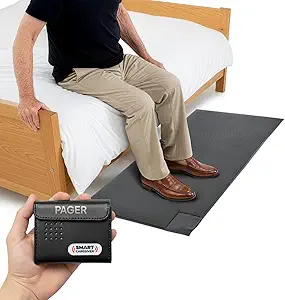 | Best for Doorway or Bedside Monitoring | Mat dimensions: 48 x 24 inches | Power source: 2 AA batteries, not included | Wireless range: 300 feet | VIEW LATEST PRICE | See Our Full Breakdown |
| Wireless Caregiver Pager Call Button for Elderly and Patients |  | Best for Long-Range Calling | Wireless range: 1000+ feet | Ringing tones: 26 | Volume levels: 4 | VIEW LATEST PRICE | See Our Full Breakdown |
| CallToU Caregiver Wireless Pager System with Call Button and Receiver |  | Best for Customizing the Alert Sound | Call buttons: 1 | Wireless range: 500+ feet | Ringtone options: 55 | VIEW LATEST PRICE | See Our Full Breakdown |
| Lunderg Wireless Early Alert Bed Alarm System for Elderly & Fall Prevention |  | Best for Pre-Rise Bed Alerts | Sensor pad size: 10 x 33 inches | Sensor technology: Pre-Alert Smart Sensor Technology | Power source: 2 AA batteries, included | VIEW LATEST PRICE | See Our Full Breakdown |
| PILSAMAS Bed Alarms for Elderly Dementia Patients, Motion Sensor Pager Set |  | Best for Privacy-Focused Bedside Monitoring | Power source: Battery powered | Alert type: Motion only | Sensor technology: Motion sensor | VIEW LATEST PRICE | See Our Full Breakdown |
| Wireless Caregiver Pager with Call Button and Receiver for Elderly and Patients |  | Best for Expanding a Simple Call System | Range: Up to 1,500 feet | Expansion: Up to 30 call buttons and multiple receivers | Ringtones: 58 built-in | VIEW LATEST PRICE | See Our Full Breakdown |
| DAYTECH WiFi Caregiver Call Button with Phone Alerts, 2 Buttons, Wristband, and Receiver |  | Best for Family Phone Alerts | Connectivity: Wi-Fi | Included components: Two buttons, wristband, and receiver | Phone alerts: Mobile app notifications | VIEW LATEST PRICE | See Our Full Breakdown |
| FullHouse Caregiver Pager Wireless Emergency Call Button for Elderly |  | Best for a Straightforward Waterproof Call Button | Range: Up to 1,000 feet | Water resistance: Splash proof; not immersible | Melodies: 52 | VIEW LATEST PRICE | See Our Full Breakdown |
More Details on Our Top Picks
Upgraded Bed Sensor Alarm and Fall Prevention System for Elderly and Dementia Patients, Wireless Motion Sensor with Caregiver Pager and Adjustable Volume
For caregivers who need to monitor a bedroom or doorway from another part of the home, this system pairs a wireless motion sensor with a pager and supports a stated range of up to 182 meters. That gives it more placement flexibility than the Smart Caregiver Bed Alarm for Elderly Adults, which uses a wired sensor pad and is described as an in-room alarm. Adjustable pager volume and dual reminders can make alerts easier to notice, while wireless placement avoids running a cable to the bed. The tradeoff is that motion sensing depends on sensor position and may not detect every exit as reliably as a pad placed under a person. It also needs three AAA batteries, so I would choose it for room-exit monitoring only after checking its detection and signal in the intended layout.
Pros:- Wireless sensor and pager allow flexible placement without a cable at the bed
- Stated range of up to 182 meters supports monitoring from farther away
- Adjustable volume and dual reminders provide alert options
- Can monitor movement at a bed or room exit
Cons:- Motion detection may miss an exit or trigger unnecessarily if placement is poor
- Three AAA batteries require periodic replacement
- Needs setup and range checks in the actual home
Best for: Caregivers monitoring a senior who may leave bed or a room while they work elsewhere in the home
Not ideal for: Households needing a pressure pad that detects when someone shifts off the mattress, or caregivers who cannot routinely check batteries and sensor placement
- Power source:Battery powered
- Batteries:3 AAA batteries included
- Maximum range:182 meters
- Sensor technology:Contact sensor
- Mounting type:Door mount
- Control method:App and touch
- Color:White
Our verdict“Choose this system when flexible, long-range motion alerts matter more than the direct bed contact sensing of the Smart Caregiver pad.”
Caregiver Pager with 2 Wireless Call Buttons for Home Care
This pager is built around a different safety need from the automatic bed alarms: it lets a senior call for help with either of two wireless buttons. A stated 500-foot range and chime or alarm modes suit a caregiver who moves between rooms or handles nearby tasks. Compared with the motion-triggered Bed Alarm for Elderly Care with Motion Sensors and Plug-in Receiver, it relies on the person remembering and being able to press a button, so it cannot independently alert when someone gets up. In return, it can support everyday requests beyond fall-risk monitoring, and the two buttons can be placed in separate spots. Its usefulness depends on keeping a button within reach and maintaining the batteries; the provided details do not specify a battery type or exact battery life.
Pros:- Two call buttons can be placed where help is commonly needed
- Stated 500-foot range supports use across a home or small care setting
- Chime and alarm modes offer different alert styles
- Buttons can be mounted or worn
Cons:- Requires the senior to notice and press a button
- Does not automatically detect bed or chair exits
- Battery type and specific battery life are not provided
Best for: Seniors who can press a call button and want a caregiver reachable from another room in a small home
Not ideal for: People with cognitive or mobility limitations who may be unable to activate a button, or households needing automatic bed-exit detection
- Call buttons:2 wireless buttons
- Range:Up to 500 feet
- Alert modes:Chime and alarm
- Mounting options:Mountable or wearable
- Battery life:Described as ultra-long lasting
- Support period:12 months
Our verdict“Pick this for a senior who can request help independently and needs two convenient call points rather than automatic motion monitoring.”
Smart Caregiver Bed Alarm for Elderly Adults
The main reason to choose this model is its 10-by-30-inch pressure pad, which alerts when pressure is removed rather than relying on movement across a room. That makes the trigger more directly tied to a person leaving the bed than the motion sensors in the Bed Alarm for Elderly Care with Motion Sensors and Plug-in Receiver. Two volume levels, a silencing button, and sensor-status and low-battery lights give caregivers useful control and feedback during routine use. The tradeoff is reach: this is a wired in-room alarm unless you buy the optional wireless add-on separately, so it does not offer the out-of-room flexibility of the Upgraded Bed Sensor Alarm. The pad also needs to be positioned under the sheet and cleaned as part of care, and its 9-volt battery is not included.
Pros:- Pressure pad detects when weight is removed from the bed
- Two volume levels and a silencing button offer basic alert control
- Status and low-battery lights help identify sensor or power issues
- Pad is described as durable and easy to clean
Cons:- Wireless alerts require a separate optional add-on
- Wired alarm limits placement and caregiver distance
- 9-volt battery is not included
Best for: Caregivers who want a direct bed-exit alert at the bedside and can respond to an in-room alarm
Not ideal for: Caregivers who need alerts sent to another room without buying an add-on, or seniors who would find a sensor pad uncomfortable
- Sensor pad size:10 x 30 inches
- Battery:One 9-volt battery; inclusion details conflict, so check the package
- Alarm volume:Two levels
- Controls:Silencing button
- Indicators:Low-battery and sensor-status lights
- Connectivity:Wired alarm; optional wireless add-on sold separately
Our verdict“Choose this bed alarm when direct pressure sensing and straightforward bedside alerts matter more than wireless caregiver reach.”
Bed Alarm for Elderly Care with Motion Sensors and Plug-in Receiver
Two motion sensors and a plug-in receiver make this a practical pick for caregivers who want alerts at selected indoor locations without setting up Wi-Fi or an app. The receiver combines a chime with a flashing light, which gives a caregiver both sound and a visible cue. Compared with the Smart Caregiver Bed Alarm for Elderly Adults, it can watch a doorway, hallway, or other area rather than relying on a pad at the mattress, but the motion trigger is more sensitive to positioning and surroundings. Pets or sunlight may interfere, so sensor placement can take adjustment. The plug-in receiver also needs an outlet, and the system is intended for indoor use. I would favor it for covering a few defined movement paths, not for confirming that pressure has lifted from a bed.
Pros:- Two sensors can cover more than one indoor location
- Plug-in receiver avoids relying on a caregiver pager battery
- Audible chime and flashing light provide sound and visual alerts
- No Wi-Fi, app, hardwiring, or monthly service is required
Cons:- Sensor aim and placement may need adjustment to reduce false alerts
- Pets or sunlight can interfere with motion sensing
- Indoor use and an available outlet are required
Best for: Caregivers who want to monitor a bed exit and nearby doorway or hallway with simple indoor alerts
Not ideal for: Households needing pressure-based bed sensing, outdoor coverage, or a discreet system that avoids possible false alerts
- Number of sensors:2 motion sensors
- Receiver:Plug-in wall receiver
- Alert types:Chime and flashing light
- Connectivity:No Wi-Fi or app required
- Suggested areas:Bedside, doorway, hallway, and living room
- Use:Indoor
Our verdict“Pick this for straightforward, outlet-powered monitoring of a few indoor movement areas when motion sensing fits the home layout.”
Smart Caregiver Fall Prevention Monitor and Weight Sensing Chair Pad
For someone at risk of standing up unassisted from a favorite chair, this 10-by-15-inch weight-sensing pad addresses a gap that bed-focused alarms do not. It alerts when the person gets up, while the soft vinyl surface is described as easy to clean and resistant to incontinence—useful traits in daily care. Unlike the Smart Caregiver Bed Alarm for Elderly Adults, this pad is sized for a chair, so it can focus monitoring where a senior spends waking hours. The tradeoff is that it depends on the pad staying connected and correctly positioned; a disconnected pad cannot alert. Its 9-volt battery is not included, and it provides no stated wireless range or remote pager details, so caregivers should check how its alarm will be heard from their usual location.
Pros:- Weight sensing alerts when someone leaves the chair
- Chair-sized format focuses on a common daytime fall-risk area
- Vinyl surface is easy to clean and resistant to incontinence
- Volume adjustment and a low-battery indicator are included
Cons:- Requires a 9-volt battery that is not included
- Pad must remain properly connected and positioned
- No wireless range or remote alert details are specified
Best for: Caregivers supporting a senior who may rise from a chair without assistance and need a cleanable seat pad
Not ideal for: People who need bed or doorway monitoring, or caregivers who cannot keep the pad connected and within hearing range
- Pad size:10 x 15 inches
- Material:Vinyl
- Sensor type:Weight sensing
- Battery:One 9-volt battery, not included
- Alert controls:Volume adjustment
- Indicator:Low-battery indicator
Our verdict“Choose this pad when chair exits are the main concern and an audible alert can reach the caregiver.”
CallToU Caregiver Pager with 2 Wireless Call Buttons for Elderly at Home
For households that need a call button in more than one spot, this two-button set offers more coverage out of the box than the single-button CallToU Caregiver Wireless Pager System. Its 500-foot range gives a caregiver room to move around the home while keeping the receiver nearby, and waterproof, dustproof buttons suit everyday placement in varied rooms. Adjustable volume and multiple ringtones can help caregivers distinguish an alert from ordinary household noise. The tradeoff is that this is a home alert system, not a roaming medical monitor: the receiver needs an outlet, and the buttons rely on replaceable batteries. I’d choose it for simple, room-to-room summoning; buyers who want a pre-rise bed alert should look at the Lunderg system instead.
Pros:- Two call buttons allow placement in separate rooms
- Wireless range of up to 500 feet supports movement around the home
- Waterproof and dustproof buttons suit varied household locations
- Adjustable volume and multiple ringtones allow alert customization
Cons:- Receiver must be plugged into an outlet
- Call buttons need battery replacements over time
- Alerts depend on the person pressing a button
Best for: Families who want call buttons in two frequently used rooms and a caregiver receiver within the home
Not ideal for: Caregivers who need alerts while away from home or a bed sensor that warns before someone stands
- Included call buttons:2 wireless buttons
- Range:500 feet
- Button power:2 x 12V alkaline batteries, included
- Audible noise:110 dB
- Control method:Touch
- Mounting type:Tabletop
- Waterproof:Yes
- Dustproof:Yes
Our verdict“Choose this set if two easy-to-reach call points matter more than automatic fall or bed-exit detection.”
Smart Caregiver Floor Mat Alarm and Pager System – Includes Wireless Pager and 24in x 48in Floor Mat Sensor
This floor mat suits caregivers who want an alert when someone steps onto a specific area, such as beside a bed or near an exit. Unlike the CallToU two-button pager, it triggers through contact, so the person does not need to remember to press a button. Its 24 by 48 inch sensor mat gives a defined detection area, while the pager’s audible and vibration alerts offer a choice between noticeable and quieter notifications. The boundary is just as clear: it alerts a caregiver after the mat is stepped on, rather than predicting a bed exit like the Lunderg Early Alert Bed Alarm. The mat also occupies floor space and requires AA batteries that are not included. It makes sense when monitoring one known route matters more than flexible call-button placement.
Pros:- Contact sensor can alert without requiring the person to press a button
- Large 24 by 48 inch mat provides a defined monitoring area
- Pager supports both audible and vibration alerts
- Wireless range reaches up to 300 feet
Cons:- Requires two AA batteries, which are not included
- Alerts only after someone steps on the mat
- Additional compatible sensors are sold separately
Best for: Caregivers monitoring a specific bedside area or doorway where a senior may walk without asking for help
Not ideal for: Households that need discreet pre-rise warning, broad room coverage, or a compact device that takes little floor space
- Mat dimensions:48 x 24 inches
- Power source:2 AA batteries, not included
- Wireless range:300 feet
- Sensor technology:Contact sensor
- Alert modes:Audible and vibration
- Color:Grey
- Warranty:1 year
Our verdict“Pick this mat when a caregiver needs to know that someone has stepped into a monitored floor area.”
Wireless Caregiver Pager Call Button for Elderly and Patients
When caregiver and senior may be far apart within a property, this pager’s stated 1000-plus-foot range gives it a longer reach than either CallToU system in this group. The person asks for help with a button press, and caregivers can choose among 26 tones and four volume levels, with volume ranging from 0 to 110 dB. That flexibility can help a household choose a sound that is noticeable without defaulting to maximum volume. The receiver plugs into an outlet, though, and the range is still a limit on where the call will reach; this is not an off-site alert service. Compared with Lunderg’s bed alarm, it depends on a person being able to press the button, but it offers a simpler way to summon help from different spots.
Pros:- Stated wireless range exceeds 1000 feet
- Twenty-six ringing tones provide a choice of alert sound
- Four volume levels range from 0 to 110 dB
- Simple button press can summon help without a sensor mat
Cons:- Receiver requires an electrical outlet
- Call only works within the specified wireless range
- Button could be misplaced if it is not secured
Best for: Caregivers who move between rooms or nearby areas and want a call button with a stated range beyond 1000 feet
Not ideal for: People who may be unable to press a button or caregivers who need alerts sent to a phone while away
- Wireless range:1000+ feet
- Ringing tones:26
- Volume levels:4
- Volume range:0 to 110 dB
- Receiver power:Plug-in
- Alert method:Call button
Our verdict“Choose this pager for long-range in-property calls when the senior can reliably reach and press the button.”
CallToU Caregiver Wireless Pager System with Call Button and Receiver
This single-button CallToU set is a straightforward fit when one reliable call point is enough and the caregiver wants plenty of control over the alert sound. Its 55 ringtone options and five volume levels offer more choice than the two-button CallToU set, which may help a caregiver pick a tone that stands out in a busy home. The 500-plus-foot range supports room-to-room movement, and the waterproof, dustproof button can be placed in a range of everyday settings. The main compromise is coverage: only one call button is included, while the other CallToU model covers two locations from the start. The receiver also needs an outlet, so this is best for a fixed home setup rather than caregivers seeking a phone-connected or out-of-home alert.
Pros:- Fifty-five ringtone options make it easy to select a distinct alert
- Five volume levels allow sound adjustment
- Wireless range is 500 feet or more
- Waterproof and dustproof call button
Cons:- Only one call button is included
- Receiver needs an electrical outlet
- A manual button press is required to request help
Best for: Households that need one call point and want a broad selection of tones and volume levels
Not ideal for: Families needing call buttons in multiple rooms or alerts that reach caregivers outside the home
- Call buttons:1
- Wireless range:500+ feet
- Ringtone options:55
- Volume levels:5
- Waterproof:Yes
- Dustproof:Yes
- Receiver power:Plug-in
Our verdict“This is a sensible one-room call system for households that value alert customization over multiple call points.”
Lunderg Wireless Early Alert Bed Alarm System for Elderly & Fall Prevention
For a senior at risk of falling when getting out of bed, the Lunderg system addresses a different moment than the CallToU pagers: its pre-rise sensor is designed to alert the caregiver as the person begins to get up, without requiring a call-button press. The wireless pager reaches up to 400 feet and can use adjustable volume or vibration, while setup does not depend on Wi-Fi or an app. That makes it a more targeted choice for bedside monitoring than the Smart Caregiver floor mat, which alerts after someone steps onto its sensor. The tradeoff is that the 10 by 33 inch pad needs careful placement, and the system works with specific compatible devices. It is best suited to caregivers focused on bed exits, rather than households seeking general-purpose call coverage.
Pros:- Pre-rise alert is designed to notify caregivers as someone gets out of bed
- Wireless range reaches up to 400 feet
- Adjustable volume and vibration modes provide alert choices
- Setup does not require Wi-Fi or apps
Cons:- Sensor pad placement may need adjustment for reliable alerts
- Requires two AA batteries, with stated battery life of 15 months
- Compatibility is limited to specified Lunderg devices
Best for: Caregivers monitoring a senior who may rise from bed without calling and needs an early alert to respond
Not ideal for: Households seeking a general call button, monitoring in several rooms, or a sensor system compatible with any device
- Sensor pad size:10 x 33 inches
- Sensor technology:Pre-Alert Smart Sensor Technology
- Power source:2 AA batteries, included
- Battery life:15 months
- Maximum range:400 feet
- Audible noise:120 dB
- Control method:Touch
- Compatible devices:Lunderg Bed Alarm, Chair Alarm, Call Button
Our verdict“Choose Lunderg when early warning of bed exits is the main safety need and a call button alone would not address it.”
PILSAMAS Bed Alarms for Elderly Dementia Patients, Motion Sensor Pager Set
The PILSAMAS motion sensor set is suited to households that want a caregiver alerted when someone gets up, without recording audio or video. Its sensor is described as detecting footstep movement, which can reduce alerts from bed shifts or pets compared with a basic bed movement alarm such as the Smart Caregiver Bed Alarm for Elderly Adults. A displayed sensor ID can help caregivers identify where an alert came from, and the claimed 1,000-foot wireless range supports monitoring across a larger home. The tradeoff is its narrow focus: it detects motion rather than offering a call button or broader activity monitoring. Placement also matters; the sensor needs to sit 15–20 inches high for best performance, and battery life can vary with use and added sensors. Choose it for movement alerts, not as a complete safety system.
Pros:- Footstep-focused detection can help limit alerts from bed movement or pets.
- Sensor ID display helps identify which monitored area triggered an alert.
- Wireless range is listed at up to 1,000 feet.
- Offers chime, vibration, and LED alert modes without monthly fees.
Cons:- Sensor placement at 15–20 inches is needed for best performance.
- Motion-only alerts do not provide a way for the person to request help.
- Battery life varies with usage and sensor expansion.
Best for: Families monitoring a person who may get out of bed and who prefer alerts without audio or video recording.
Not ideal for: Caregivers who need two-way communication, a call button, or monitoring beyond detected movement.
- Power source:Battery powered
- Alert type:Motion only
- Sensor technology:Motion sensor
- Maximum range:1,000 feet
- Connectivity:Wireless
- Compatible devices:Caregiver pager and receiver
- Dimensions:2.6 × 1.2 × 3.9 inches
- Weight:9.6 ounces
- Battery cell type:Lithium polymer
Our verdict“Pick PILSAMAS for privacy-minded alerts when someone gets up from bed, but pair it with a call system if they need to summon help.”
Wireless Caregiver Pager with Call Button and Receiver for Elderly and Patients
This call button and receiver set makes sense when the person can press for help and caregivers need a straightforward alert across a large home. Its stated 1,500-foot range exceeds the 1,000-foot claims for both the FullHouse Caregiver Pager and PILSAMAS bed alarm, while expansion to as many as 30 call buttons can cover multiple rooms or users. The 58 ringtones and adjustable volume, reaching a listed 120 dB, give caregivers options for making alerts noticeable. Those features do not add automatic fall or bed monitoring: unlike PILSAMAS, this system depends on someone pressing the button. It also lacks smartphone integration, so caregivers away from the receiver may miss a call. I’d choose it for a household that wants a customizable local alert network, provided the receiver can stay powered and within hearing range.
Pros:- Listed wireless range of up to 1,500 feet.
- Expandable to up to 30 call buttons and multiple receivers.
- 58 built-in ringtones and five volume levels allow alert customization.
- IP55 waterproof and dustproof rating supports use in varied environments.
Cons:- Provides a basic call alert rather than automatic movement or fall detection.
- No smartphone integration for caregivers away from the receiver.
- Requires a power source for operation.
Best for: Households with multiple care recipients or rooms that want to add call buttons and receivers to one local alert system.
Not ideal for: Caregivers who need phone notifications or automatic alerts when someone cannot reach or press a button.
- Range:Up to 1,500 feet
- Expansion:Up to 30 call buttons and multiple receivers
- Ringtones:58 built-in
- Volume:Five levels, up to 120 dB
- Operating temperature:-4°F to 140°F
- Warranty:18 months
Our verdict“Choose this pager when you want a scalable, long-range call system and someone nearby can respond to its receiver.”
DAYTECH WiFi Caregiver Call Button with Phone Alerts, 2 Buttons, Wristband, and Receiver
The DAYTECH set is the lineup’s clearest fit for families who need an alert to reach people on their phones, not only someone standing near a receiver. It includes two call buttons, a wristband, and a receiver, giving a person options for requesting help from different spots. App notifications can also be shared with multiple family members, a practical distinction from the Wireless Caregiver Pager with Call Button and Receiver, which relies on its local receiver. This convenience depends on Wi-Fi and internet access; the provided details do not list a cellular backup or a wireless range, so I would not choose it for a home where connectivity is unreliable. The receiver also needs an outlet. Compared with the simpler FullHouse pager, DAYTECH offers remote family alerts, but asks more of the household’s network setup.
Pros:- App notifications can reach family members beyond the room with the receiver.
- Includes two call buttons, a wristband, and a receiver.
- Customizable sounds and volume provide multiple alert options.
- Shared notifications support coordination among family caregivers.
Cons:- Full functionality depends on an internet connection and Wi-Fi.
- No cellular network support is listed as a backup.
- Receiver must be plugged into an outlet.
Best for: Families who share caregiving and want call-button alerts delivered to multiple members’ phones over home Wi-Fi.
Not ideal for: Households without reliable internet or caregivers who need alerts to work over a cellular connection.
- Connectivity:Wi-Fi
- Included components:Two buttons, wristband, and receiver
- Phone alerts:Mobile app notifications
- Product dimensions:4.8 × 4.1 × 3.6 inches
- Weight:10.2 ounces
- Battery:One 12V battery included
- Receiver power:Plug-in
Our verdict“Choose DAYTECH if shared phone alerts are worth the Wi-Fi dependency and outlet placement in your home.”
FullHouse Caregiver Pager Wireless Emergency Call Button for Elderly
FullHouse keeps the job simple: the person presses a call button, and a powered receiver alerts someone nearby. Its splash-proof button can be useful near a bathroom, where a handheld call option may matter; the maker specifies that it is not immersible. The receiver offers 52 melodies, five volume levels up to 110 dB, and LED alerts, so households can tailor the signal. Compared with the Wireless Caregiver Pager with Call Button and Receiver, FullHouse lists a shorter maximum range—1,000 feet versus 1,500—and less expansion detail. It may still suit a home or care facility where a basic button-and-receiver setup is enough. Like that longer-range pager, it relies on someone pressing the button and the receiver being plugged in; it does not send phone alerts like DAYTECH.
Pros:- Splash-proof call button is suited to use near bathroom sinks or showers.
- Up to 1,000 feet of stated range supports use across many homes.
- Five volume levels reach up to 110 dB, with LED alerts also available.
- 52 melodies let households select a recognizable alert.
Cons:- Button is not designed to be immersed in water.
- Plug-in receiver needs a suitable outlet and nearby caregiver.
- A person must be able to press the button to call for help.
Best for: Care recipients who can press a button and need a simple local alert, including near a bathroom where splash resistance is useful.
Not ideal for: Caregivers who need an immersible button, phone notifications, or the longer stated range of the 1,500-foot pager.
- Range:Up to 1,000 feet
- Water resistance:Splash proof; not immersible
- Melodies:52
- Volume:Five levels, up to 110 dB
- Receiver power:Plug-in
- Alert indicators:Sound and LED
Our verdict“Choose FullHouse for a basic splash-resistant call button and local receiver when remote phone alerts and automatic monitoring are not needed.”
How We Picked
I compared these devices by the safety task they perform: detecting bed movement, sensing a bed or chair exit, monitoring a floor area, or letting someone request help. I ranked options higher when their alert method matched a clear household need and offered a practical way for a caregiver to receive the signal, such as a portable pager or phone notification. Ease of use, alert adjustability, installation demands, and how much of the routine each device can cover also shaped the order.
The ranking reflects tradeoffs, not a claim that one alarm can prevent every fall. A sensor-based system can alert a caregiver without a button press, but it may cause alerts during ordinary movement and still depends on someone hearing or receiving the signal. A call button is simpler and often more direct, but only helps when the person can reach and operate it. I placed targeted systems ahead of general-purpose kits when they address a specific risk pattern, then considered flexible and simple options for other households.
Factors to Consider When Choosing Senior-friendly Home Safety Devices
Start with the moment when help is most likely to be needed, then choose a device that covers that moment without adding steps the senior or caregiver cannot manage.
Match the alert to the actual risk
Identify whether the concern is an unattended bed exit, standing from a chair, walking into a particular area, or being unable to call for help. A wearable or bedside call button relies on deliberate action; a motion or pressure sensor can alert without it. Families sometimes buy a call button for someone who cannot reliably reach or press it, then discover it does not address the main risk. Conversely, a sensor alarm can be intrusive when a person moves around independently and safely. Choose the narrowest alert that covers the vulnerable moment, and add another device only if a separate gap remains.
Check what happens after an alert
An alarm only helps when the right person receives it and can respond. Think through where the caregiver will be, whether they carry a pager, and whether phone notifications are useful or likely to be missed among other alerts. A receiver in one room may not help someone working elsewhere, while WiFi-based alerts depend on a suitable network and device setup. Agree on who responds at different times of day before relying on the system. If a senior lives alone, a local caregiver pager alone may not reach anyone outside the home.
Plan for movement, privacy, and false alerts
Sensor placement changes what the system detects: a floor mat covers only the area where it sits, and a bed or chair sensor monitors one position. Measure the space and think about how the person approaches, transfers, and walks around furniture. A sensor that triggers on routine movement may lead caregivers to ignore it, while an overly limited detection area can miss the event it was meant to catch. Discuss monitoring with the senior and position devices in a way that respects privacy and independence. Revisit the setup after changes in mobility or furniture layout.
Choose controls the senior can manage
Buttons should be easy to reach, identify, and press for the person who will use them, including at night or from a chair. A wrist-worn call option can stay close, but it may be unsuitable if the wearer dislikes accessories or forgets to put it on. Keep instructions short and practice a help request together so the motion becomes familiar. Caregivers should also know how to silence, reset, or relocate the receiver. A feature-rich device is a poor fit if routine operation depends on someone remembering a complicated sequence.
Account for upkeep and household changes
Before choosing, check the device’s power source, battery replacement needs, pairing steps, and any network requirements in its current product information. Put battery checks and alert checks into an existing household routine rather than waiting for a problem. Consider whether the equipment can move easily if the senior changes bedrooms or spends time in another part of the home. Multiple receivers or sensors may improve coverage, but they also add setup and maintenance. Prefer a system the household can keep working over one whose features exceed its capacity to maintain it.
Frequently Asked Questions
Should I choose a bed alarm or a caregiver call button?
Choose a bed alarm when the main concern is someone getting up without a caregiver present, especially if they may not remember or be able to press a button. Choose a call button when the person can reliably request help and needs a straightforward way to do so. These devices solve different problems, so one should not be treated as a substitute for the other. Think about whether the risk happens before the senior can ask for help. If both situations occur, a combined approach may make sense, but it requires caregivers to manage two alert paths.
Can a caregiver pager alert someone who is outside the home?
A basic wireless pager generally signals its paired receiver within its operating range; it does not automatically contact someone away from that receiver. Phone-connected options such as a WiFi call system may send remote notifications, subject to their app, network, and account requirements. Confirm the product’s coverage and notification behavior rather than assuming a wireless label means remote access. Also consider who will respond if a phone is muted, offline, or unattended. For a senior who spends time alone, plan a backup way to reach help.
Is a floor mat alarm suitable for someone who walks around at night?
It can alert a caregiver when someone steps onto the mat’s monitored area, which may help when the expected path from bed is predictable. It will not monitor the entire room or detect movement that bypasses the mat. Nighttime walking can also produce frequent alerts, so placement should account for normal routes and caregiver response. Keep edges and cables arranged to avoid creating a tripping obstacle. If movement patterns change, reassess whether the mat still covers the relevant area.
Do these devices replace supervision or emergency response?
No alarm can guarantee that a fall will be prevented or that help will arrive immediately. Sensors and call buttons notify someone through their receiver or phone, and the outcome depends on that person noticing and responding. A device may also miss events, produce an alert during normal activity, or stop working if power or connectivity fails. Use it as one part of a household safety plan that accounts for check-ins, mobility support, and access to emergency help. Match the plan to the person’s needs with guidance from their care team when appropriate.
How many call buttons or sensors should a household set up?
Start with the locations where help requests or risky movement are most likely, such as the bedside and a frequently used chair. More buttons can improve access across rooms, but only if receivers cover those areas and caregivers can identify which alert has sounded. Sensors should map to specific risks rather than being scattered around without a response plan. Walk through the senior’s usual day and check that the device remains reachable during transfers and nighttime routines. Expand coverage when you find a real gap, then test the full alert path.
Conclusion
For most households focused on bed exits, my best overall is the Lunderg Wireless Early Alert Bed Alarm System, while the best value for a specific monitoring need is the Smart Caregiver Floor Mat Alarm and Pager System when a defined bedside path is the concern. The best premium-style connected choice is the DAYTECH WiFi Caregiver Call Button for caregivers who want phone alerts and can manage the added setup. For beginners, a straightforward wireless call button kit such as the CallToU Caregiver Pager is a sensible starting point when the senior can press it consistently. Choose a bed or chair sensor for unprompted movement, a floor mat for a predictable route, and a call button for direct requests; the best fit is the one that covers the household’s specific risk and has a clear responder.