
Senior-friendly smart home devices now cover far more than medical alerts: this roundup compares caregiver call buttons, app-connected pagers, fall detection systems, door alarms, and even a TV-based remote care hub. The Nomo Medical Alert System with Fall Detection earns the best overall spot because it is the only option here that summons help automatically when a fall occurs, without requiring the senior to press anything. For families on a budget, the CallToU Caregiver Pager delivers dependable button-to-receiver alerting at a fraction of monitored-service prices, while the JubileeTV Remote Care System stands apart as the pick for staying connected with a parent who resists traditional safety gadgets. The main tradeoffs you will face in this category are monthly fees versus one-time cost, whether alerts go to an app or a local receiver, and how much setup complexity an older adult (or a remote caregiver) can realistically manage. Keep reading for the full breakdown, including which systems work best for dementia care and which ones are best skipped.

Turn quiet afternoons into listening time
- Thousands of audiobooks, podcasts and originals
- Listen on your phone, tablet or Echo — also offline
- Cancel anytime
Complete the kit


Key Takeaways
- Automatic fall detection was the single biggest differentiator in this lineup — only the Nomo system offers it, which is why it ranks best overall despite its higher price.
- App-controlled systems (DAYTECH, SINGCALL Tuya models, JoneR) suit remote family caregivers, while simple receiver-and-button kits (CallToU, generic wireless pagers) suit in-home caregivers who may not manage apps well.
- No product in this roundup requires a monthly fee, but the tradeoff is that none connects to a professional 24/7 monitoring center — alerts go to family members’ phones or a local receiver instead.
- For dementia and wandering risk, the PILSAMAS door alarm and the Smart Caregiver floor mat alarm solve different problems than call buttons: they alert caregivers proactively rather than waiting for the senior to ask for help.
- Two-way voice capability (JoneR and the WiFi Caregiver Pager Life Alert system) proved more reassuring for anxious seniors than one-way alerts, because the caregiver can immediately speak to the person who pressed the button.
| WiFi Caregiver Pager Medical Alert System for Seniors with App Control and Call Buttons |  | Best Overall | Range: 426ft / 130m | Call Buttons: 2 | Receivers: 1 | VIEW LATEST PRICE | See Our Full Breakdown |
| DAYTECH WiFi Caregiver Call Button with Phone Notification |  | Best Value | Call Buttons: 1 (wrist-worn) | Wrist Button: Yes | Receivers: 2 | VIEW LATEST PRICE | See Our Full Breakdown |
| Life Alert Systems for Seniors No Monthly Fee App-Controlled with Waterproof Wristband and 2-Call Buttons |  | Best for Bathroom Safety | Waterproof Wristband: Yes | Call Buttons: 2 | Display: 6 LED number display | VIEW LATEST PRICE | See Our Full Breakdown |
| SINGCALL Tuya WiFi Smart SOS Caregiver Personal Alert Call Button Alarm |  | Best Compact Pick | Power Source: Battery powered (1 lithium-ion, included) | Voltage: 3.6 volts | Control Method: App, touch | VIEW LATEST PRICE | See Our Full Breakdown |
| JoneR WiFi Caregiver Call Button with Voice for Elderly at Home, 2-Way Calls |  | Best for Voice Interaction | Connectivity: Wi-Fi | Battery: None to charge | Warranty: 2 years | VIEW LATEST PRICE | See Our Full Breakdown |
| WiFi Caregiver Pager Life Alert System for Seniors with Waterproof Call Button, Watch Button, and Receiver |  | Best for Remote Family Caregivers | Connectivity: 2.4GHz Wi-Fi | Range: 656 feet (200 meters) | Waterproof: Yes | VIEW LATEST PRICE | See Our Full Breakdown |
| CallToU Caregiver Pager with 2 Wireless Call Buttons for Elderly at Home |  | Best Value | Number of Call Buttons: 2 | Range: 500+ ft | Volume Levels: 5 | VIEW LATEST PRICE | See Our Full Breakdown |
| Nomo Medical Alert System with Fall Detection for Seniors |  | Best Premium Safety Net | Components: Smart Hub, two Satellite range extenders, wearable Tags | Connectivity: WiFi (no landline required) | Key Features: Fall detection, emergency alerts, two-way voice | VIEW LATEST PRICE | See Our Full Breakdown |
| Wireless Caregiver Pager with Call Button and Receiver for Elderly and Patients |  | Best for Large or Multi-Room Facilities | Maximum Range: 1500 feet | Expandability: Up to 30 call buttons, multiple receivers | Durability Rating: IP55 water and dust resistant | VIEW LATEST PRICE | See Our Full Breakdown |
| PILSAMAS Wi-Fi Smart Door Alarm with LED ID Display and Caregiver Pager |  | Best for Wandering and Dementia Monitoring | Connectivity: 2.4GHz Wi-Fi (no 5GHz support) | Range: 328 feet | Power: USB-powered receiver; AAA batteries in sensors | VIEW LATEST PRICE | See Our Full Breakdown |
| SINGCALL Tuya WiFi Wireless Calling Smart SOS Button Caregiver Pager System |  | Best Single-Button Simplicity | Power Source: 1 CR2 lithium battery (included) | Control Method: App and touch | Alert Volume: 100 dB with volume control | VIEW LATEST PRICE | See Our Full Breakdown |
| JubileeTV Remote Care System for Seniors |  | Best for Long-Distance Family Caregiving | Compatibility: Most setups with HDMI, WiFi, and cable or streaming device | Remote: Large backlit voice remote | Membership: $29/month, $289/year, or $600 one-time | VIEW LATEST PRICE | See Our Full Breakdown |
| PILSAMAS WiFi Smart Caregiver Pager with 1 Receiver, 2 Call Buttons & Wristband |  | Best Complete Caregiver Kit | Included Devices: 1 receiver, 2 call buttons, 1 wristband, WiFi hub | Range: 328 feet | Signal Technology: 433MHz wireless | VIEW LATEST PRICE | See Our Full Breakdown |
| Smart Caregiver Floor Mat Alarm and Pager System – Wireless Alert for Seniors and Dementia Patients | 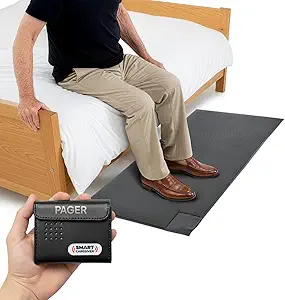 | Best for Wandering and Fall Prevention | Mat Size: 24 x 48 inches | Alert Range: Up to 300 feet | Alert Types: Audible and vibrate | VIEW LATEST PRICE | See Our Full Breakdown |
| senior-friendly smart home device | Connectivity |
|---|---|
| WiFi Caregiver Pager Medical A | WiFi, 433MHz |
| DAYTECH WiFi Caregiver Call Bu | Wi-Fi |
| Life Alert Systems for Seniors | — |
| SINGCALL Tuya WiFi Smart SOS C | 2.4GHz Wi-Fi via Tuya |
| JoneR WiFi Caregiver Call Butt | Wi-Fi |
| WiFi Caregiver Pager Life Aler | 2.4GHz Wi-Fi |
| CallToU Caregiver Pager with 2 | — |
| Nomo Medical Alert System with | WiFi (no landline required) |
| Wireless Caregiver Pager with | — |
| PILSAMAS Wi-Fi Smart Door Alar | 2.4GHz Wi-Fi (no 5GHz support) |
| SINGCALL Tuya WiFi Wireless Ca | — |
| JubileeTV Remote Care System f | — |
| PILSAMAS WiFi Smart Caregiver | — |
| Smart Caregiver Floor Mat Alar | Wireless — no WiFi or app required |
More Details on Our Top Picks
WiFi Caregiver Pager Medical Alert System for Seniors with App Control and Call Buttons
This option earns the top spot because it balances range, volume, and multi-user alerts better than anything else in this batch. The 426ft signal range makes it the strongest choice for large or multi-story homes, where the SINGCALL SOS Button would depend entirely on Wi-Fi reach. Four volume levels and 22 ringtones up to 120dB mean it works for seniors with hearing impairments, something the app-only alerts on other picks can’t solve. Two call buttons let a caregiver cover a bedroom and bathroom, though unlike the Life Alert system with Waterproof Wristband, there’s no confirmation this hardware is shower-safe. The tradeoff for having no monthly fee is that everything funnels through a smartphone app — if family members don’t keep notifications on, alerts can be missed.
Pros:- No monthly fee for emergency alerts
- 426ft range covers large and multi-story homes
- 120dB ringtones suit hearing-impaired users
- Alerts can be shared with multiple family members
Cons:- Full functionality depends on the smartphone app
- Battery details unspecified, replacements likely needed
- No confirmed waterproofing for shower use
Best for: Families in larger homes who need multiple call points and loud, hearing-friendly alarms with app backup
Not ideal for: Seniors living alone without a smartphone-savvy family member actively monitoring alerts
- Range:426ft / 130m
- Call Buttons:2
- Receivers:1
- Connectivity:WiFi, 433MHz
- Volume Levels:4
- Ringtones:22
- Monthly Fee:None
Our verdict“The most complete package for big households that want loud in-home alerts plus app notifications to distant family.”
DAYTECH WiFi Caregiver Call Button with Phone Notification
For straightforward caregiving on a budget, this kit makes the most sense because it bundles a wearable wrist button plus two receivers at a lower complexity than the WiFi Caregiver Pager Medical Alert System. The wrist form factor matters: a senior can press for help from anywhere in the room rather than walking to a wall-mounted unit. Where it cuts corners compared with pricier rivals is notification depth — text and phone-call alerts require a paid upgrade, while app and alarm alerts are free. Setup is genuinely simple with 20 ringtones and five volume levels, making it a friendlier first device than the app-heavy JoneR voice unit. Just know the receivers need wall power, so placement is limited to outlet locations, and range specs aren’t published, which is a real gap for spread-out homes.
Pros:- Wrist button keeps help within reach at all times
- Two receivers with loud alarms included
- Easy setup with 20 ringtones and 5 volume levels
- Shared notifications for multiple caregivers
Cons:- Text and phone-call alerts require a paid upgrade
- Receivers need Wi-Fi and a power outlet
- No published range or battery-life details
Best for: Budget-minded families who want a wearable button and loud in-home receivers without paying recurring fees
Not ideal for: Caregivers who aren’t in the house often and rely on text or phone-call alerts — those cost extra here
- Call Buttons:1 (wrist-worn)
- Wrist Button:Yes
- Receivers:2
- Connectivity:Wi-Fi
- Notification Types:App, phone, text (upgrade available)
- Alarm Volume Levels:5
- Ringtone Options:20
Our verdict“The most practical entry point for in-home caregiving, as long as you can live with app-only notifications.”
Life Alert Systems for Seniors No Monthly Fee App-Controlled with Waterproof Wristband and 2-Call Buttons
Bathroom falls are among the most common household accidents for seniors, and this is the only pick in the batch with a confirmed waterproof wristband rated for shower use. That single feature separates it from the DAYTECH Call Button, whose wrist button carries no waterproof claim, and from the wall-mounted SINGCALL button, which can’t come into the shower at all. The 300ft range with reliable wall penetration and a 6-LED display that shows which button was pressed give caregivers useful context at a glance. The tradeoffs are real though: it’s locked to 2.4GHz Wi-Fi networks, so newer mesh routers may need reconfiguring, and SMS notifications sit behind a subscription — the app alerts remain free, but the fee structure feels less clean than rivals.
Pros:- Waterproof wristband works in the shower
- No monthly fee for basic app alerts
- Multiple caregivers receive notifications
- Signal penetrates walls reliably up to 300 feet
Cons:- SMS notifications require a subscription
- Limited to 2.4GHz Wi-Fi only
- Needs a smartphone for full functionality
Best for: Seniors who live alone and need an alert they can press in the shower or bath, where most falls happen
Not ideal for: Homes running only 5GHz Wi-Fi, or buyers who expect every notification type free of charge
- Waterproof Wristband:Yes
- Call Buttons:2
- Display:6 LED number display
- Wi-Fi Support:2.4GHz
- Range:Up to 300 feet
- Compatible Apps:Tuya Smart, Smart Life
- Monthly Fee:None for app alerts; SMS requires subscription
Our verdict“The clear choice if shower-safe coverage is the priority, provided your router supports 2.4GHz.”
SINGCALL Tuya WiFi Smart SOS Caregiver Personal Alert Call Button Alarm
One button, one battery, one app — this SINGCALL unit wins on simplicity and portability. Unlike the receiver-based systems from DAYTECH or the WiFi Caregiver Pager, there’s no hub to plug in, which makes it a better fit for temporary situations: a hospital room, a hotel stay, or a relative’s guest room. It’s wall-mountable yet light enough to reposition, and notifications can be shared with several smartphones through the Tuya ecosystem. The compromises are structural: it’s Wi-Fi only with no cellular fallback, so if the internet drops, so does the alert path. The single lithium-ion battery also means charging discipline is required, and the low-battery warning only helps if someone notices it. For a primary safety device in a large home, the WiFi Caregiver Pager’s louder, multi-receiver setup is safer; as a portable backup, this wins.
Pros:- No hub or receiver required — works anywhere with Wi-Fi
- Wall-mountable yet fully portable
- Notifications shared with multiple smartphones
- Rechargeable battery included
Cons:- Wi-Fi only, no cellular backup if internet fails
- Single battery requires regular charging
- Limited to environments with 2.4GHz Wi-Fi
Best for: Caregivers who need a portable, hub-free alert button for travel, temporary stays, or secondary rooms
Not ideal for: Anyone wanting a primary emergency system — Wi-Fi dependence and battery charging make it too fragile for that role
- Power Source:Battery powered (1 lithium-ion, included)
- Voltage:3.6 volts
- Control Method:App, touch
- Mounting Type:Wall mount
- Connectivity:2.4GHz Wi-Fi via Tuya
- Compatible Devices:Smartphone
- Color:Blue
Our verdict“A smart secondary or travel alert button, but not sturdy enough to be a household’s only safety net.”
JoneR WiFi Caregiver Call Button with Voice for Elderly at Home, 2-Way Calls
This pick stands apart because help can be summoned without pressing anything at all — voice activation plus tap options mean a senior who has fallen and can’t reach a button can still call out. The two-way intercom adds something no other product here offers: the ability to actually talk with a family member mid-emergency rather than just receive an alert. Compared with the DAYTECH wrist button, it removes the wearable entirely, which suits seniors who resist straps and chargers — there’s no battery to charge and a generous 2-year warranty. But it’s stationary and homebound, so it can’t follow a senior outside the way a wristband can, and a quirk in the design means the alarm can only trigger once before needing to be re-linked, which could matter in a prolonged emergency.
Pros:- Voice activation means no button press required
- Two-way intercom enables real conversation during an alert
- No wearable and no battery to charge
- Alerts reach multiple family members worldwide
Cons:- Alarm triggers only once before requiring a re-link
- Home-only use; not portable outside the house
- Needs Wi-Fi and internet to function
Best for: Seniors who dislike wearables and want voice-triggered help with real two-way conversation with family
Not ideal for: Active seniors who leave the house regularly — this offers zero protection outside the home
- Connectivity:Wi-Fi
- Battery:None to charge
- Warranty:2 years
- Trigger Methods:Voice command, tap
- Key Features:Two-way intercom, voice activation, multi-user alerts, adjustable volume
- Monthly Fee:None
- Portability:Stationary, home use only
Our verdict“The most communicative option on this list, ideal for homebound seniors whose family wants to talk, not just be pinged.”
WiFi Caregiver Pager Life Alert System for Seniors with Waterproof Call Button, Watch Button, and Receiver
This option stands out for its hybrid alert design: a local receiver for in-home caregivers plus app notifications so adult children living elsewhere can see when a parent needs help. Compared with the CallToU Caregiver Pager, which only alerts people inside the house, this system closes the distance gap that separates many families. The 656-foot range with wall penetration is generous for most single-family homes, and the watch button is a genuine advantage over pendant-only systems because seniors are far more likely to keep a watch on their wrist than a lanyard around their neck. The tradeoffs are real, though: SMS and phone-call alerts sit behind a subscription, and it demands a 2.4GHz Wi-Fi network, which rules out homes running 5GHz-only routers.
Pros:- App notifications extend alerts beyond the home to remote family members
- Watch-style button is more likely to stay worn than a pendant
- 656-foot range penetrates walls reliably
- Three mounting options (screw, adhesive, lanyard) fit different mobility levels
Cons:- SMS and call alerts require an ongoing subscription
- Only works on 2.4GHz Wi-Fi networks
- Limited device compatibility compared with expandable systems
Best for: Adult children coordinating care remotely with an in-home caregiver who needs both local and smartphone alerts
Not ideal for: Households without reliable 2.4GHz Wi-Fi, or buyers who refuse subscription fees for phone and text alerts
- Connectivity:2.4GHz Wi-Fi
- Range:656 feet (200 meters)
- Waterproof:Yes
- Included Devices:Call button, watch button, receiver
- Mounting Options:Screw, adhesive patch, lanyard
- Alert Delivery:Receiver chime plus app notifications; SMS/call via subscription
Our verdict“This pick makes the most sense for families splitting care duties between an in-home helper and remote relatives who both need instant alerts.”
CallToU Caregiver Pager with 2 Wireless Call Buttons for Elderly at Home
For straightforward, no-subscription, no-Wi-Fi caregiving, this two-button kit is the value benchmark in this roundup. Unlike the WiFi Caregiver Pager Life Alert System, there is nothing to configure, no router requirement, and no monthly fee — plug in the receiver, mount the buttons, and it works. The second call button is a meaningful inclusion: one can live in the bathroom while the other stays at the bedside, covering the two rooms where seniors most often need help. With 55 ringtones and five volume levels, caregivers can distinguish between rooms or tune the volume down at night. Its limits are structural: alerts stop at the receiver’s speaker, so nobody outside the house learns of an emergency, and the receiver must occupy an outlet, which constrains where it can be placed.
Pros:- No Wi-Fi, app, or subscription required — works out of the box
- Two waterproof, dustproof buttons cover multiple rooms
- 55 ringtones and 5 volume levels allow room-specific alerts
- Portable receiver can move with the caregiver
Cons:- Receiver must stay plugged into an outlet
- Alerts are local only — no remote family notification
- Not suitable for large properties or outdoor use
Best for: Budget-conscious families with a live-in caregiver who only needs in-home audio alerts with zero recurring costs
Not ideal for: Seniors living alone, since the receiver’s chime provides no way to summon help when no one is home
- Number of Call Buttons:2
- Range:500+ ft
- Volume Levels:5
- Ringtones:55
- Waterproof / Dustproof:Yes
- Power:Plug-in receiver, battery-powered buttons
Our verdict“The most sensible low-cost choice when a caregiver is physically present and a second button for the bathroom matters more than smartphone alerts.”
Nomo Medical Alert System with Fall Detection for Seniors
This is the only product in this batch that addresses the scenario caregivers fear most: a senior who cannot press a button because they are unconscious or disoriented after a fall. Its automatic fall detection, two-way voice communication, and optional 24/7 professional monitoring put it in a different category from pager-style options like the CallToU Caregiver Pager, which depends entirely on the senior being conscious and a caregiver being in range. The inclusion of two Satellite range extenders means whole-house coverage in larger homes where single-hub systems drop out. The costs are equally clear: monitoring runs on a subscription, fall detection can generate false alarms, and the manufacturer is vague about battery life and tag range — details that matter when safety is the whole point.
Pros:- Automatic fall detection works even when the senior cannot press a button
- Two-way voice communication enables instant conversation with responders
- Range extenders cover larger homes
- Plug-and-play setup with no landline required
Cons:- Ongoing subscription required for monitoring services
- Fall detection can trigger false alarms
- Battery life and tag range are not clearly documented
Best for: Seniors living independently whose families want automatic fall detection and the option of professional emergency response
Not ideal for: Buyers avoiding monthly fees, or those satisfied with simple button-press pagers for a fully present caregiver
- Components:Smart Hub, two Satellite range extenders, wearable Tags
- Connectivity:WiFi (no landline required)
- Key Features:Fall detection, emergency alerts, two-way voice
- Monitoring:24/7 monitoring with optional subscription
- Setup:Plug-and-play installation
Our verdict“The right choice when a fall-prone senior lives alone and a pager that requires a conscious button press simply is not enough protection.”
Wireless Caregiver Pager with Call Button and Receiver for Elderly and Patients
Where this system pulls ahead of every rival here is scale. A 1500-foot range, support for up to 30 call buttons and multiple receivers, and an IP55 water-and-dust rating make it better suited to care homes, assisted living wings, or very large houses than anything else in this lineup. The CallToU pager, by contrast, tops out around 500 feet and two buttons — fine for a house, inadequate for a corridor of rooms. The loud 120dB alert cuts through noise in busy facilities. What buyers give up is sophistication: there is no display, no two-way talk, and no app connectivity, so it is purely an audible pager. Battery power for the whole system also means periodic battery swaps, and a dead battery in a call button is a silent failure mode worth monitoring.
Pros:- 1500-foot range is the longest in this batch
- Expandable to 30 call buttons and multiple receivers
- IP55 water and dust resistance suits bathrooms and clinical settings
- Loud 120dB alert is audible in noisy environments
Cons:- Basic function only — no display, app, or two-way communication
- Battery-powered, requiring regular replacement
- No indication of which specific button was pressed
Best for: Small care facilities, memory care units, or very large homes managing alerts from many rooms at once
Not ideal for: Solo caregivers who want app alerts, two-way communication, or any visibility into which room needs help
- Maximum Range:1500 feet
- Expandability:Up to 30 call buttons, multiple receivers
- Durability Rating:IP55 water and dust resistant
- Alert Loudness:120 dB
- Power Source:Battery powered (lithium)
- Control Method:Touch
Our verdict“Choose this when coverage area and expandability matter more than smart features — otherwise a Wi-Fi pager covers a normal home better.”
PILSAMAS Wi-Fi Smart Door Alarm with LED ID Display and Caregiver Pager
This entry solves a different problem than the call buttons above: it tells a caregiver when a door opens, which is essential for dementia and Alzheimer’s care where wandering is the primary risk. The LED ID display identifies which door triggered the alert — something no pager in this roundup offers — while the app adds history logs, auto-schedules, and family sharing without monthly fees. Compared with the Smart Caregiver Floor Mat Alarm, which alerts on bed or chair exits, this covers the perimeter instead, and the two approaches complement each other. Its 328-foot range is the shortest among the Wi-Fi options here, the sensors demand careful alignment during installation, and like the WiFi Caregiver Pager Life Alert System, it is locked to 2.4GHz networks with SMS alerts gated behind an in-app purchase.
Pros:- LED ID display shows exactly which door was opened
- Free lifetime app alerts with history logs and auto-schedules
- No cameras or audio recording, preserving senior privacy
- Pre-paired sensors work immediately after setup
Cons:- Requires 2.4GHz Wi-Fi with no 5GHz support
- Sensors need precise alignment to detect reliably
- SMS and call alerts require an in-app purchase
Best for: Families caring for someone with dementia or a tendency to wander who need to know the moment a door opens
Not ideal for: Buyers seeking a help-call system — this monitors doors only and has no wearable button for the senior
- Connectivity:2.4GHz Wi-Fi (no 5GHz support)
- Range:328 feet
- Power:USB-powered receiver; AAA batteries in sensors
- Alarm Melodies:18 options
- Volume Levels:4, including mute
- App Features:Auto-schedules, history logs, family sharing
- Privacy:No cameras or audio; optional SMS/call alerts
Our verdict“The clear pick for wandering prevention, as long as the goal is knowing when a door opens rather than giving the senior a way to call for help.”
SINGCALL Tuya WiFi Wireless Calling Smart SOS Button Caregiver Pager System
When the goal is one button, zero confusion, this SINGCALL unit delivers the cleanest proposition in the batch. Unlike the PILSAMAS kit, which bundles two buttons, a wristband, and a hub, this keeps everything to a single palm-sized SOS button that pairs directly to a phone app — fewer parts means fewer things for a senior to misplace or misunderstand. The 100 dB alert is loud enough to be heard across a house, and the IP55 waterproofing means it survives bathroom mounting, where most falls happen. The tradeoff is scope: there is no wristband option and no receiver, so a caregiver must have the app open or notifications enabled to respond. It also insists on 2.4GHz WiFi, which can frustrate households running mesh networks on 5GHz only.
Pros:- Single-button design eliminates confusion for users with memory or dexterity issues
- Loud 100 dB alert with adjustable volume and mute
- IP55 waterproofing allows bathroom and outdoor mounting
- Alerts can be shared with multiple family members through the app
Cons:- Limited to 2.4GHz WiFi networks
- CR2 battery requires periodic replacement
- No standalone receiver — depends entirely on smartphone notifications
Best for: Seniors living mostly independently who need one simple waterproof emergency button tied to family phones
Not ideal for: Caregivers wanting a physical receiver or wristband — this app-only alerting model has no in-room chime
- Power Source:1 CR2 lithium battery (included)
- Control Method:App and touch
- Alert Volume:100 dB with volume control
- Waterproof Rating:IP55
- Wireless Range:Up to 100 meters
- Mounting:Wall mount
- Dimensions:2.2 x 2.2 x 2.2 inches
- Operating Temperature:-20°C to 50°C
Our verdict“Buy this if you want the simplest possible one-button alert; skip it if you need a wristband or in-home chime receiver.”
JubileeTV Remote Care System for Seniors
This is the only product in the roundup built for connection rather than emergencies. Where the SINGCALL button and the Smart Caregiver Floor Mat exist to signal a crisis, JubileeTV turns the television — the device seniors already use daily — into a channel for video calls, reminders, and quiet check-ins from anywhere. The large backlit voice remote is thoughtfully designed for low vision and cognitive decline, which most generic remotes in this space ignore. The catch is cost: unlike every pager-style system here, it demands an ongoing membership ($29/month or $289/year), and it is restricted to U.S. households with an existing cable or streaming setup. If a family wants fall detection or SOS capability, this cannot replace a dedicated alert button — it complements one.
Pros:- Remote TV control lets family fix channels and settings from anywhere
- Voice remote with large backlit buttons suits low vision and cognitive decline
- Combines video calls, reminders, and wellness alerts in one hub
- Works with most HDMI, WiFi, and cable or streaming setups
Cons:- Requires paid membership ($29/month, $289/year, or $600 one-time)
- U.S. only
- Not an emergency alert system — no SOS button or fall detection
Best for: Adult children living far from a parent who want daily touchpoints, video calls, and TV help without phone coaching
Not ideal for: Budget-conscious buyers or anyone outside the U.S. — the required membership and regional restriction are dealbreakers
- Compatibility:Most setups with HDMI, WiFi, and cable or streaming device
- Remote:Large backlit voice remote
- Membership:$29/month, $289/year, or $600 one-time
- Availability:U.S. only
- Key Functions:Remote TV control, video calls, reminders, alerts
Our verdict“Worth it for families separated by distance who want everyday connection through the TV; skip it if you need emergency alerting or want to avoid subscriptions.”
PILSAMAS WiFi Smart Caregiver Pager with 1 Receiver, 2 Call Buttons & Wristband
For buyers who want every form factor in one box, this PILSAMAS package is the most versatile pick here. You get two wall-mountable call buttons, a wearable hypoallergenic wristband, a physical receiver, and app notifications — covering the bedside, bathroom, and wrist simultaneously. Compared with the SINGCALL SOS Button, its 328-foot range and through-wall 433MHz signal are meaningfully better for larger homes, and the IP65 rating outclasses IP55 for wet zones like showers. The wristband is the key differentiator: a senior who collapses away from a wall button still has help on their wrist. Drawbacks are real, though — SMS, phone call, and email alerts sit behind optional paid plans, and like most of this roundup, it will not connect to 5GHz networks.
Pros:- Complete kit: wristband plus two buttons plus receiver out of the box
- 328-foot range with reliable through-wall 433MHz connectivity
- IP65 waterproof buttons safe for showers and wet rooms
- Customizable tones, alert sharing, and history logging in the app
Cons:- SMS, call, and email alerts require optional paid plans
- Only 18 alert tones to choose from
- Requires a 2.4GHz WiFi network
Best for: Households or small care facilities covering multiple rooms and wanting both wearable and fixed call points
Not ideal for: Minimalists or tight budgets — the extra hardware and optional alert plans are overkill for a single-room need
- Included Devices:1 receiver, 2 call buttons, 1 wristband, WiFi hub
- Range:328 feet
- Signal Technology:433MHz wireless
- WiFi Compatibility:2.4GHz only
- Waterproof Rating:IP65
- Wristband Material:Hypoallergenic
- App Features:Customizable tones, alert sharing, history viewing
Our verdict“The strongest all-around kit for multi-room coverage; pass if you only need one button and want to avoid subscription upsells.”
Smart Caregiver Floor Mat Alarm and Pager System – Wireless Alert for Seniors and Dementia Patients
Every other product in this roundup waits for someone to press a button — this one acts without any action from the senior. The 24×48 inch pressure mat placed beside a bed or doorway triggers a pager up to 300 feet away the moment weight lands on it, which makes it uniquely valuable for dementia patients who wander at night or those who cannot reliably press a call button. Unlike the PILSAMAS kit, it needs no WiFi, no app, and no smartphone at all — a genuine advantage for technophobic caregivers. The limitations follow from that simplicity: it detects movement, not emergencies, so it cannot tell you whether the senior is okay. Add the fact that batteries are not included and extra sensors cost more, and the total price climbs quickly.
Pros:- Triggers automatically — no button press or user cooperation needed
- 300-foot wireless range covers most homes and facilities
- Pager offers both audible and discreet vibrate alerts
- No WiFi, app, or smartphone required to operate
Cons:- Batteries not included — 2 AA required at purchase
- Additional sensors for other doors or beds sold separately
- Detects movement only — cannot confirm wellbeing or summon outside help
Best for: Dementia caregivers who need to know the instant someone gets out of bed or approaches a door — no button-pressing required
Not ideal for: Alert, independent seniors who can call for help themselves — a mat alarm adds little for them
- Mat Size:24 x 48 inches
- Alert Range:Up to 300 feet
- Alert Types:Audible and vibrate
- Power:2 AA batteries (not included)
- Connectivity:Wireless — no WiFi or app required
- Warranty:1 year
Our verdict“The right choice for nighttime wandering and fall-risk monitoring; pair it with a call button like the SINGCALL for true emergency coverage.”
How We Picked
I evaluated each device against the criteria that matter most when a senior’s safety is on the line: reliability of the alert path (does the signal reliably reach a phone, receiver, or both), ease of setup and daily use (can an older adult operate it without training, and can a non-technical caregiver install it), and waterproofing and wearable comfort, since many alerts happen in the bathroom where falls are most common. I also weighed versatility — whether a system supports multiple buttons, wristbands, or room coverage — and total cost of ownership, including whether a device locks you into subscriptions.
The ranking logic follows risk level. Devices that act without the senior pressing a button (fall detection, floor mats, door alarms) rank higher because they cover the scenarios where a person cannot call for help. App-connected systems with two-way voice come next, since immediate communication reduces panic and speeds response. Basic button-and-receiver kits fill the value tier: dependable for their purpose, but only as good as the caregiver’s proximity and the senior’s ability to press. Products ranked lowest either duplicate stronger options at similar prices or add complexity without a clear safety benefit.
Factors to Consider When Choosing Senior-friendly Smart Home Devices
Choosing a senior safety device is less about features and more about matching the device to the specific risks and routines of the person you are protecting. Before buying, work through these factors — they explain most of the mistakes families make in this category.Who Actually Receives the Alert?
This is the most overlooked question in the category. A device that pings a phone app is useless if the designated caregiver sleeps through notifications or works somewhere with poor signal, and a receiver-only system fails the moment the in-home caregiver steps into the yard. Think about the alert chain end to end: who gets notified, how fast, and what can they actually do about it at 3 a.m. from twenty miles away. Families who live far from their parent should prioritize app-based systems with call functionality, while those sharing a home benefit from the instant, phone-free simplicity of a receiver. A common mistake is buying for the caregiver’s convenience rather than for response speed — a loud receiver in the kitchen outperforms a silent push notification every time if someone is home.
Subscription Versus One-Time Cost
Every device in this roundup is purchase-once with no monthly fee, and that is a genuine advantage over traditional monitored medical alert services. But be honest about the tradeoff: no-fee systems rely on family, not professionals. If nobody answers the alert, nobody is coming. For seniors who live alone with few nearby relatives, a monitored service with a live emergency operator may justify its $25–$50 monthly cost despite the weaker feature set. For families with an active caregiving network, the one-time-cost approach saves hundreds of dollars a year. The mistake to avoid is assuming the cheapest upfront option is the cheapest long-term safety solution — the real cost is measured in response time.
Press-to-Call Versus Automatic Detection
A call button only works when the person can reach it and press it. Falls that cause confusion, loss of consciousness, or simply a dropped wristband render button systems silent — which is why automatic detection fills the most dangerous gap in senior safety. Fall detection costs more and can generate false alarms, but it covers the scenario families fear most. Passive alternatives like floor mats and door alarms occupy a middle ground: they detect movement patterns rather than falls, making them especially valuable for dementia patients who wander at night. When budgeting, ask which failure mode is most likely for your situation — a senior who can reliably press a button needs less automation than one prone to dizzy spells.
Bathroom and Bedroom Coverage
The bathroom is statistically the most dangerous room in the home, yet many buyers forget to check whether buttons and wristbands are actually waterproof rather than water-resistant. A splash-rated button that fails after a shower defeats the purpose of wearing it constantly. Range matters too: verify the wireless signal reaches from the bathroom or bedroom to wherever the receiver lives, especially in homes with thick walls or multiple floors. Test the system immediately after installation from every room where the senior spends time alone. The cheapest insurance here is redundancy — a wristband button plus a wall-mounted button in the shower area covers both wearable fatigue and forgotten devices.
Setup Complexity and Who Manages It
WiFi-based systems require router configuration, app accounts, and occasional troubleshooting — fine if a tech-comfortable family member handles it, frustrating if the senior manages their own devices. Simpler receiver-based kits work out of the box but offer no remote visibility. Before choosing, decide who is the system administrator and match the technology to their skill level, not the senior’s. Also check what happens during a power or internet outage: some app systems go completely offline while receiver-based kits keep working on battery. Dementia households should lean toward systems the caregiver controls entirely, since any device requiring senior interaction will eventually confuse rather than help.
Dignity and Willingness to Wear
The best device is the one the senior will actually use, and many families discover too late that a parent refuses a medical-alert wristband because it looks like a hospital tag. Watch-style buttons, discreet pendants, and integrated devices like a TV remote care system can dramatically improve adoption compared to obvious medical gear. Involve the senior in the choice where possible — resistance to being monitored is often resistance to how the monitoring looks and feels, not to safety itself. A modest device worn every day outperforms a feature-rich system left in a drawer.
Frequently Asked Questions
Do any of these devices work without WiFi or internet?
Yes, and this matters more than most buyers realize. Receiver-based kits like the CallToU pager and the generic wireless caregiver pagers communicate directly between button and receiver, so they keep working during internet or power outages (most run on batteries). WiFi-dependent systems — the DAYTECH, SINGCALL Tuya models, JoneR, and similar app-connected devices — lose their phone notification capability when the router goes down. If your area has unreliable internet or the senior’s WiFi is spotty, choose a system with a local receiver as the primary alert path and treat app notifications as a bonus. Hybrid systems that include both a physical receiver and app alerts offer the best of both worlds.
Can a call button system replace a traditional monitored medical alert service?
It depends entirely on who responds when the alert fires. These systems notify family members or nearby caregivers rather than a professional monitoring center, so they work well when someone reliable can answer within minutes. If the senior lives alone and adult children are spread across the country or often unreachable, a monitored service with 24/7 operators remains the safer choice despite its monthly fee. The honest framing is that no-fee systems replace the response infrastructure with your family’s availability. Many families actually run both: a button system for everyday convenience calls and a monitored service as the emergency backstop.
Which of these is best for a parent with dementia who wanders at night?
For wandering risk, proactive detection beats call buttons, because a confused senior will not reliably press for help. The PILSAMAS door alarm alerts you the moment a door opens, which is the highest-value warning for nighttime wandering, and the Smart Caregiver floor mat alarm triggers when someone steps out of bed — giving you a head start before they reach an exit. Call buttons still have a place for earlier-stage dementia, but plan around the reality that the device must not depend on the senior’s judgment. Pairing a bed-exit or door sensor with a receiver in the caregiver’s bedroom is the most effective low-cost configuration for this scenario.
Are these devices difficult for a non-technical caregiver to set up?
It varies sharply by type, and this is where the lineup splits. Receiver-based kits are genuinely plug-and-play: pair the buttons, plug in the receiver, and you are done in ten minutes. WiFi app systems require downloading an app, connecting the device to your home network, and creating accounts — manageable for anyone comfortable with a smartphone, but a real barrier for caregivers who are not. If you are setting up a system remotely for a parent’s home, app-connected devices are actually easier because you can configure and monitor them from your own phone. Ask yourself honestly who will troubleshoot it six months from now, and buy at that skill level.
Is fall detection worth the extra cost compared to a regular call button?
Fall detection is worth it precisely for the situations a button cannot solve: unconsciousness, severe confusion, or a wristband knocked out of reach during the fall. Those scenarios represent a minority of incidents, but they are the most dangerous ones, and no button-based system in this roundup covers them. The downsides are price and false alarms — a hard sit onto a couch can sometimes trigger an alert, which annoys some users into disabling the feature. If your senior has a history of falls, balance issues, or lives alone, the Nomo’s automatic detection justifies its cost. If the main need is calling a caregiver for help getting up or for routine assistance, a well-placed button system does that job for much less.
Conclusion
Matching the right device to your situation matters more than any single product’s spec sheet. For best overall protection, the Nomo Medical Alert System with Fall Detection covers the one scenario every other device in this roundup misses — a fall the senior cannot report. For the best value, the CallToU Caregiver Pager delivers dependable alerting at a budget price, and the DAYTECH WiFi button is a close runner-up if you need phone notifications. For beginners or non-technical households, simple receiver kits like the Wireless Caregiver Pager with Call Button avoid apps and setup headaches entirely. On the premium side, the JubileeTV Remote Care System takes a different approach entirely, wrapping safety check-ins into a device seniors already love — the TV remote. For specific needs: choose the PILSAMAS door alarm or the floor mat system for dementia and wandering, the JoneR or WiFi Caregiver Pager Life Alert system when two-way voice reassurance matters, and the waterproof wristband kits for bathroom-heavy fall risk. Whatever you choose, test the full alert path on day one — a safety device nobody has verified is just a gadget.
Halloween Picks

10ft Halloween Inflatable Archway – Pumpkin Skeleton Yard Décor

Haunted Hill Farm 4.6-Ft. Spinning Beatrix Halloween Animatronic

MGparty 14.5 ft Halloween Inflatable Walk-In Pumpkin House with LED Lights
As an affiliate, we earn on qualifying purchases.