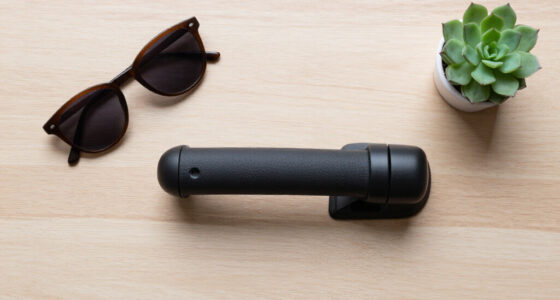
Medical alert systems for seniors differ most in how help is summoned and who receives the alert. I name the Medical Guardian MGMini my best overall pick for seniors who need a mobile device, while the SecuLife SOS Wristband stands out for wrist-worn GPS and fall detection, and the Freedom Alert Landline Personal Emergency Device suits people who want two-way calling through a landline. The main tradeoff is between a personal emergency response system designed to reach help away from home and a caregiver pager that alerts someone nearby. Features such as GPS, fall detection, and direct 911 calling can change who responds and where the system works. Read on for the full breakdown and help matching a system to the senior’s routine and support network.

Give the gift of listening to someone you love
- Choose a 1-, 3-, 6- or 12-month membership
- They pick the audiobooks they love
- Easy to send by email
Complete the kit


Key Takeaways
- Mobile alert devices and household caregiver pagers serve different needs. The MGMini and SecuLife options are designed around mobile use and communicating through the device; the CallToU, Daytech, and similar pager systems alert a nearby caregiver rather than acting as equivalent emergency response services.
- GPS, fall detection, and two-way calling appear together on the SecuLife mobile options. Buyers should still check how these features work in the selected plan and whether the wearer will charge and carry the device.
- Home coverage depends on receiver placement and alert reach, not just the number of buttons. Multi-receiver kits from CallToU and Daytech may help caregivers hear alerts in more rooms, while a mobile system is more suited to outings.
- Landline and direct-911 devices make distinct compromises. Freedom Alert uses a landline and two-way calling, while 911 Help Now is designed for direct 911 calls; neither should be assumed to provide the same response path as a monitored service.
- The broadest feature list is not automatically the best fit. The strongest choice depends on whether the senior needs outside-the-home coverage, caregiver notification inside the home, or a simpler call button that someone nearby can answer.
| Medical Guardian MGMini Medical Alert Device for Seniors, Silver |  | Best for On-the-Go Monitoring | Connectivity: Cellular with Wi-Fi backup | Alert and communication: SOS button and two-way speaker | Location features: GPS assistance and hourly location updates | VIEW LATEST PRICE | See Our Full Breakdown |
| SecuLife SOS Wristband for Seniors with Fall Detection, GPS Tracking, Geofencing, and Two-Way Calling |  | Best Screen-Free Caregiver-Connected Wristband | Device type: Screen-free medical alert wristband | Connectivity: Cellular | Alert features: SOS button and fall detection | VIEW LATEST PRICE | See Our Full Breakdown |
| Freedom Alert Landline Personal Emergency Device with Two-Way Calling |  | Best No-Monthly-Fee Landline Option | Connection: Landline required | Communication: Two-way voice calling | Pendant: Wearable or mountable | VIEW LATEST PRICE | See Our Full Breakdown |
| TurboSense Wi-Fi Caregiver Alert System with Pendant, Wrist Button, and Receiver |  | Best for Home Alerts With App Notifications | Included components: Waterproof call button, SOS watch button, and receiver | App connectivity: 2.4GHz Wi-Fi push notifications | Button signal: 433MHz | VIEW LATEST PRICE | See Our Full Breakdown |
| Wireless Caregiver Pager with Call Button and Receiver |  | Best for Long-Range Household Caregiver Alerts | Included components: 1 call button and 1 receiver | Power source: Battery powered; lithium battery | Maximum stated range: Up to 1,500 feet | VIEW LATEST PRICE | See Our Full Breakdown |
| SecuLife Medical Alert Pendant for Seniors with Fall Detection, GPS Tracking, and 2-Way Calling |  | Best for Active Seniors Living Independently | Connectivity: 4G LTE cellular | Alerts: Automatic fall detection and SOS alerts | Calling: Hands-free two-way calling | VIEW LATEST PRICE | See Our Full Breakdown |
| PRNBRH Senior Medical Alert System with App Notifications, Waterproof Wristband, Receiver, and LED Number Display |  | Best for No-Fee Basic Home Alerts | Model: CF106 | Included components: Two panic buttons, one wristband remote, and one receiver | Connectivity: 2.4 GHz Wi-Fi and wireless signal | VIEW LATEST PRICE | See Our Full Breakdown |
| Waterproof Medical Alert System with Wrist and Necklace Buttons |  | Best for Landline-Based Emergency Contact | Included alert buttons: Two: one wrist button and one necklace button | Maximum alert buttons: Eight | Stated coverage range: 70,000 square feet | VIEW LATEST PRICE | See Our Full Breakdown |
| CallToU Wireless Caregiver Pager System with 3 Receivers and 2 Call Buttons |  | Best for Caregivers Covering Multiple Rooms | Included components: Three receivers and two call buttons | Wireless range: Up to 150 meters; 500+ feet in open areas | Ringtones: 55 | VIEW LATEST PRICE | See Our Full Breakdown |
| 911 Help Now Medical Alert Pendant with Direct 911 Calling |  | Best for Direct 911 Calling Without a Subscription | Cellular connectivity: 4G LTE | Emergency calling: Direct call to 911 | SOS activation: Press and hold for three seconds | VIEW LATEST PRICE | See Our Full Breakdown |
| CallToU Caregiver Pager System with 2 Wireless Call Buttons and 2 Receivers |  | Best for Multi-Room Coverage | Brand: CallToU | Model: CC01 2-2 | Included components: 2 call buttons and 2 receivers | VIEW LATEST PRICE | See Our Full Breakdown |
| CallToU Wireless Caregiver Pager and Intercom System with 2 Receivers, 2 Call Buttons, and 2 Walkie-Talkies | 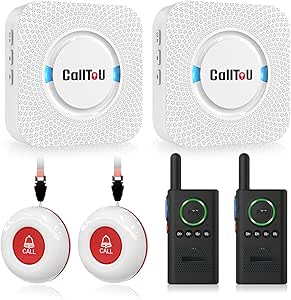 | Best for Caregiver Communication | Brand: CallToU | Included components: 2 receivers, 2 call buttons, 2 walkie-talkies | Maximum stated range: Up to 500 feet in open areas; under 300 feet recommended indoors | VIEW LATEST PRICE | See Our Full Breakdown |
| CallToU Wireless Caregiver Pager with Call Button |  | Best Simple Starter Set | Brand: CallToU | Model: 1-1 | Included components: 1 plug-in receiver and 1 call button | VIEW LATEST PRICE | See Our Full Breakdown |
| DAYTECH Wi-Fi Caregiver Call Button System with 2 Buttons, Wrist Button, and Receiver |  | Best for Shared App Alerts | Brand: DAYTECH | Model: CR02TY-CT02WR-WB06WH | Included components: 2 call buttons, 1 wrist button, 1 receiver | VIEW LATEST PRICE | See Our Full Breakdown |
| Daytech Wireless Caregiver Pager and Call Button System with Portable Receivers |  | Best for Wearable Alerts Around the Home | Brand: Daytech | Model: E-01W; LC01US 4-3 | Included items: 2 watches, 2 call buttons, 3 receivers | VIEW LATEST PRICE | See Our Full Breakdown |
| medical alert systems for senior | Included components |
|---|---|
| Medical Guardian MGMini Medica | — |
| SecuLife SOS Wristband for Sen | — |
| Freedom Alert Landline Persona | — |
| TurboSense Wi-Fi Caregiver Ale | Waterproof call button, SOS watch button, and receiver |
| Wireless Caregiver Pager with | 1 call button and 1 receiver |
| SecuLife Medical Alert Pendant | — |
| PRNBRH Senior Medical Alert Sy | Two panic buttons, one wristband remote, and one receiver |
| Waterproof Medical Alert Syste | — |
| CallToU Wireless Caregiver Pag | Three receivers and two call buttons |
| 911 Help Now Medical Alert Pen | — |
| CallToU Caregiver Pager System | 2 call buttons and 2 receivers |
| CallToU Wireless Caregiver Pag | 2 receivers, 2 call buttons, 2 walkie-talkies |
| CallToU Wireless Caregiver Pag | 1 plug-in receiver and 1 call button |
| DAYTECH Wi-Fi Caregiver Call B | 2 call buttons, 1 wrist button, 1 receiver |
| Daytech Wireless Caregiver Pag | — |
More Details on Our Top Picks
Medical Guardian MGMini Medical Alert Device for Seniors, Silver
The Medical Guardian MGMini is the strongest fit here for seniors who leave home and want a monitored alert device rather than a household-only call button. Its SOS button, two-way speaker, and GPS location assistance let the wearer speak with a 24/7 monitoring team, while hourly location updates can help with locating them. Compared with the Freedom Alert Landline Personal Emergency Device, the MGMini is built for use away from home, but it requires an active subscription and has a shorter listed battery life than a system designed to stay plugged in at home. Up to three days per charge offers more breathing room than the SecuLife wristband’s listed one-day battery, though signal conditions can affect runtime. Fall detection is optional, not included. I’d choose it for mobility and monitoring, not for buyers seeking a no-fee or fall-detection-included setup.
Pros:- Connects the wearer to a 24/7 monitoring team through its two-way speaker.
- GPS assistance and hourly location updates support use away from home.
- Up to three days of battery life per charge is longer than the SecuLife wristband’s listed one day.
- Includes a lanyard and clip for different ways to wear the device.
Cons:- Monitoring must be activated and requires a subscription.
- Fall detection is an optional add-on rather than a standard feature.
- Battery life can vary with cellular signal and network conditions.
Best for: Seniors who regularly go out alone and want 24/7 monitoring with GPS location assistance and two-way communication.
Not ideal for: People who want to avoid recurring monitoring fees, or who need fall detection included rather than as an add-on.
- Connectivity:Cellular with Wi-Fi backup
- Alert and communication:SOS button and two-way speaker
- Location features:GPS assistance and hourly location updates
- Battery life:Up to 3 days per charge
- Recharge time:4 hours
- Monitoring:24/7 subscription required; no long-term contract; cancel anytime
- Fall detection:Optional add-on
- Included wearing accessories:Clip and lanyard
Our verdict“Choose the MGMini if you want a monitored alert device for outings and can manage its subscription and charging routine.”
SecuLife SOS Wristband for Seniors with Fall Detection, GPS Tracking, Geofencing, and Two-Way Calling
The SecuLife SOS Wristband suits families who want location tools and direct caregiver contact in a screen-free wearable. Its fall detection, GPS tracking, geofencing, and two-way calling can help caregivers stay informed, while the IP67 rating is suited to ordinary exposure to splashes and handwashing. Unlike the Medical Guardian MGMini, which connects to a 24/7 monitoring team, this wristband is described as calling preset contacts through its companion app; buyers should not treat those services as interchangeable. Its listed one-day battery life means daily charging is part of the routine, a sharper limitation than the MGMini’s up-to-three-day claim. The screen-free design keeps interaction simple, but it also leaves less on-device information for the wearer. I’d pick it for app-connected family care, not for anyone seeking monitoring-center service or a longer charge interval.
Pros:- Combines SOS calling with automatic fall detection.
- GPS tracking and geofence notifications can help caregivers follow location changes.
- Two-way calling supports communication through the companion app.
- IP67-rated, screen-free design is suited to everyday wear.
Cons:- Requires a monthly subscription.
- Listed battery life is one day, calling for frequent charging.
- Unlike the Medical Guardian MGMini, it is described as contacting preset people rather than a 24/7 monitoring team.
Best for: Families who want a senior to wear a screen-free wristband with fall alerts, GPS and caregiver calling through a smartphone app.
Not ideal for: Seniors who need 24/7 monitoring-center response, or who are unlikely to charge a wearable every day.
- Device type:Screen-free medical alert wristband
- Connectivity:Cellular
- Alert features:SOS button and fall detection
- Location features:GPS tracking and geofencing
- Calling:Two-way calling through the SecuPro app
- Water resistance:IP67
- Battery life:1 day
- Subscription:Required
Our verdict“Choose this wristband for app-connected family alerts and fall detection if daily charging and a subscription fit your routine.”
Freedom Alert Landline Personal Emergency Device with Two-Way Calling
The Freedom Alert Landline Personal Emergency Device is a straightforward choice for someone who spends most of their time at home, already has a landline, and wants two-way voice communication without monthly operating fees. Its wearable or mountable pendant lets the user speak directly through the system, while a 24-hour battery backup offers some coverage during a power interruption. That makes it a different proposition from the Medical Guardian MGMini: Freedom Alert avoids a monitoring subscription but is designed for home use and requires landline service, while the MGMini supports outings and uses 24/7 subscription monitoring. It also lacks the GPS and location updates offered by the MGMini. I’d favor Freedom Alert for a landline household that values direct calling and avoids recurring fees; it is a poor fit for seniors who go out alone or lack a landline.
Pros:- Two-way voice calling supports direct communication with emergency contacts or services.
- No monthly operating fees are listed.
- The pendant can be worn or kept on its mount.
- Includes a 24-hour battery backup.
Cons:- Requires existing landline phone service.
- Designed for at-home use rather than outings.
- Does not offer the GPS location assistance available on the Medical Guardian MGMini.
Best for: Landline households seeking a rechargeable at-home emergency device with two-way calling and no monthly operating fees.
Not ideal for: Seniors who spend time away from home, have no landline service, or want GPS location assistance and 24/7 monitoring.
- Connection:Landline required
- Communication:Two-way voice calling
- Pendant:Wearable or mountable
- Power:Rechargeable
- Battery backup:24 hours
- Monthly operating fees:None
Our verdict“Choose Freedom Alert for landline-based home coverage without monthly operating fees, but not for protection on the go.”
TurboSense Wi-Fi Caregiver Alert System with Pendant, Wrist Button, and Receiver
The TurboSense Wi-Fi Caregiver Alert System is for households that want a local receiver plus smartphone notifications when a senior presses a button. It includes both a waterproof pendant-style button and a wrist button, so the wearer can choose a format, while the receiver provides an audible alert. Its 433MHz button signal has a stated open-area range of up to 656 feet, but walls and interference can reduce that reach. Compared with the STECHRO Wireless Caregiver Pager, TurboSense adds Wi-Fi app push notifications, while STECHRO lists a longer open-area range and expandable button capacity. This is a home assistance alert, not a medical monitoring service: it has no automatic fall detection or monitoring team. Push notifications are listed without a monthly fee, but phone and SMS alerts may require paid app service.
Pros:- Includes both a pendant-style call button and a wrist button.
- Can sound the receiver and send app push notifications over Wi-Fi.
- Waterproof call button supports use around water.
- Receiver volume is adjustable.
Cons:- It is a home assistance alert, not medical monitoring, and has no automatic fall detection.
- The stated 656-foot range applies to open areas and may be reduced indoors.
- Phone and SMS alerts may require paid app service.
Best for: Families who want a receiver and app push alerts when a senior presses a pendant or wrist button at home.
Not ideal for: Seniors who need a 24/7 monitoring team, automatic fall detection, or reliable coverage outside the home.
- Included components:Waterproof call button, SOS watch button, and receiver
- App connectivity:2.4GHz Wi-Fi push notifications
- Button signal:433MHz
- Stated maximum range:Up to 656 feet (200 m) in open areas
- Receiver:Adjustable volume
- Waterproof button:Yes
- Medical monitoring:Not provided
- Automatic fall detection:Not provided
Our verdict“Choose TurboSense for household call-button alerts with app push notifications, not as a substitute for monitored medical alert service.”
Wireless Caregiver Pager with Call Button and Receiver
The STECHRO Wireless Caregiver Pager makes the most sense when the goal is to alert a nearby caregiver across a home or property, not to contact a monitoring center. Its 1,500-foot stated wireless range exceeds the TurboSense system’s 656-foot open-area claim, and its receiver offers five volume levels up to 120 dB. That may help an alert carry through a larger space, though real range depends on the setting. STECHRO also supports up to 30 call buttons and multiple receivers, which gives households room to add alert points; TurboSense instead includes both a wrist button and Wi-Fi app push notifications. The tradeoff is a simpler setup with no listed GPS, two-way calling, or medical monitoring. Its call button and receiver are separate, and battery power means upkeep rather than a subscription-based monitoring service.
Pros:- Stated wireless range reaches up to 1,500 feet.
- Five volume levels range up to 120 dB.
- Can expand to up to 30 call buttons and multiple receivers.
- IP55-rated against dust and water.
Cons:- Provides caregiver alerts rather than medical monitoring or emergency response.
- Battery-powered components require battery upkeep.
- Call button and receiver are separate components.
Best for: Caregiver households that need a loud, expandable call-button alert system across a larger home or property.
Not ideal for: Seniors who live alone and need GPS, automatic fall detection, two-way communication, or a 24/7 monitoring center.
- Included components:1 call button and 1 receiver
- Power source:Battery powered; lithium battery
- Maximum stated range:Up to 1,500 feet
- Ringtones:58
- Volume:5 levels, from 0 to 120 dB
- Ingress protection:IP55
- Expandable capacity:Up to 30 call buttons and multiple receivers
- Operating temperature:-4°F to 140°F
Our verdict“Choose STECHRO for an expandable, long-range alert between a senior and nearby caregivers, not for independent emergency monitoring.”
SecuLife Medical Alert Pendant for Seniors with Fall Detection, GPS Tracking, and 2-Way Calling
GPS tracking, automatic fall detection, and two-way calling make this the most mobile-focused option in this group. Unlike the home-based PRNBRH Senior Medical Alert System, the SecuLife pendant is designed to accompany the wearer outside the house, with geofencing and location history giving selected contacts more context about their whereabouts. Its IP67 rating supports regular wear in wet conditions, while auto-answer calling can help a senior speak hands-free.
The tradeoff is ongoing service: a monthly subscription is required, and this is not a direct-to-911 device like the 911 Help Now pendant. Battery life is listed as up to six days, but product information also gives an average of five, so caregivers should plan for frequent charging rather than rely on the maximum figure.
Pros:- Automatic fall detection and an SOS button can alert preselected contacts.
- GPS tracking, geofencing, and location history support check-ins beyond the home.
- Two-way calling, including auto-answer for incoming calls, supports hands-free communication.
- IP67 water resistance and several days of stated battery life suit regular wear.
Cons:- A monthly subscription is required for service.
- Battery information varies between an average of five days and a maximum of six days.
- It contacts preselected contacts rather than offering the direct 911 calling described for 911 Help Now.
Best for: Seniors who spend time away from home and want GPS location sharing, geofence alerts, and hands-free contact with selected people.
Not ideal for: People who want a no-subscription device, direct 911 calling, or a simple home-only alert button.
- Connectivity:4G LTE cellular
- Alerts:Automatic fall detection and SOS alerts
- Calling:Hands-free two-way calling
- Location features:GPS tracking, geofencing, and up to one year of location history
- Water resistance:IP67
- Battery:1000 mAh; listed as up to six days, with average life also stated as five days
- Display:Shows time, battery, and signal
- Subscription:$20 per month
Our verdict“Choose the SecuLife pendant if location features and contact-based calling matter more than avoiding a subscription.”
PRNBRH Senior Medical Alert System with App Notifications, Waterproof Wristband, Receiver, and LED Number Display
No monthly fee for basic pager use gives this system a different role from the SecuLife pendant, which relies on a subscription for its mobile features. PRNBRH pairs two panic buttons with a receiver that sounds an alarm and displays a number; the wrist remote can be worn in the shower, where a stationary call button may be less useful. App notifications add a way for caregivers to receive alerts, and the stated wireless range reaches up to 300 feet.
This is still a home alert system, not a mobile medical alert service: it does not list GPS or two-way voice calling. Its internet-outage operation applies to the wireless pager function, while app notifications rely on connectivity. Only the wrist remote is waterproof, and SMS alerts require a subscription. Compared with the landline-based Waterproof Medical Alert System, it adds app connectivity but needs 2.4 GHz Wi-Fi for that feature.
Pros:- Basic pager use has no monthly fee.
- Waterproof wristband remote can be worn while showering.
- Receiver provides an audible alarm and an LED number display.
- Wireless signal is stated to reach up to 300 feet and continue working during internet outages.
Cons:- SMS notifications require a subscription.
- Only the wrist-worn remote is specified as waterproof.
- App connectivity supports 2.4 GHz Wi-Fi only, and the system does not list GPS or two-way calling.
Best for: Seniors who mainly need a wearable in-home alert button and caregivers who want receiver alarms with optional app notifications.
Not ideal for: Seniors who need GPS outside the home, two-way conversation, or a waterproof receiver and buttons throughout.
- Model:CF106
- Included components:Two panic buttons, one wristband remote, and one receiver
- Connectivity:2.4 GHz Wi-Fi and wireless signal
- Maximum range:Up to 300 feet
- Alarm volume:110 dB
- Display:LED number display
- App compatibility:Tuya Smart or Smart Life
- Monthly fee:None for basic pager use; SMS notifications require a subscription
Our verdict“Pick PRNBRH for straightforward home alerts without a basic-service fee, but choose a mobile pendant if help is needed away from home.”
Waterproof Medical Alert System with Wrist and Necklace Buttons
For a senior who already has a home phone line and wants alerts to reach family directly, this system offers a straightforward alternative to app-based PRNBRH: press a wrist or necklace button, and the base calls up to three numbers in sequence, playing a personalized message. Having two wearable formats lets the user choose what feels comfortable, while the large push button is intended to be easy to activate. The buttons are waterproof, which suits use around the shower.
Its main limitation is the phone connection. A home landline is required unless you add the optional Bluetooth adapter for cellphone use, so it is less flexible than SecuLife’s cellular pendant for seniors who go out often. The claimed 70,000-square-foot coverage may also vary with home layout and conditions; treat it as a stated range, not a guarantee. It calls contacts but does not list two-way calling or automatic fall detection.
Pros:- Includes both a wrist button and a necklace button.
- Waterproof buttons are suited to wearing around water.
- Can call up to three phone numbers in sequence and play a personalized emergency message.
- Supports up to eight alert buttons, allowing additional buttons to be added.
Cons:- Requires a home phone line unless used with the optional Bluetooth adapter.
- The stated 70,000-square-foot coverage can vary with home layout and conditions.
- Calls contacts but does not list two-way calling or automatic fall detection.
Best for: Seniors who spend most of their time at home, have a landline, and want wrist and necklace alert choices that call family contacts.
Not ideal for: People without a home phone line who do not want an optional adapter, or those who need GPS, automatic fall detection, or mobile coverage.
- Included alert buttons:Two: one wrist button and one necklace button
- Maximum alert buttons:Eight
- Stated coverage range:70,000 square feet
- Phone connection:Home phone line; optional Bluetooth adapter for cellphone use
- Emergency calling:Calls up to three numbers in sequence
- Emergency message:Personalized message playback
- Power and batteries:Battery powered; two AAA batteries included
- Base unit dimensions:6.5 x 4.5 x 1.7 inches
Our verdict“Choose this system if the senior has a landline and wants simple button-triggered calls to family rather than a cellular mobile alert.”
CallToU Wireless Caregiver Pager System with 3 Receivers and 2 Call Buttons
Three plug-in receivers and two call buttons make this a practical way for an at-home caregiver to hear requests from several parts of the house. Compared with the single-receiver PRNBRH system, CallToU spreads the alert across more rooms, which can help when a caregiver is moving around rather than staying near one base. Buttons can be worn on a neck strap or mounted, and the choice of 55 ringtones and five volume levels lets households adjust the signal to their layout and hearing needs.
This is a caregiver pager, not a monitored medical alert service: it does not list GPS, fall detection, or calls to emergency services. The call buttons and receivers are described as waterproof and dustproof, but receivers still need electrical outlets. Its up-to-150-meter range is stated for open areas, so walls and the home layout may reduce reach. For seniors who need a direct call to 911, 911 Help Now serves a different purpose.
Pros:- Three receivers can sound in multiple areas of the home.
- Two call buttons can be worn with a neck strap or mounted.
- Offers 55 ringtone choices and five volume levels, including a stated range up to 110 dB.
- Call buttons and receivers are described as waterproof and dustproof.
Cons:- Receivers need electrical outlets, limiting placement.
- The stated 150-meter range applies to open areas and may be shorter indoors.
- Does not list GPS, fall detection, or direct emergency-service calling.
Best for: Households with a caregiver who moves between rooms and needs alerts from more than one call button.
Not ideal for: Seniors living alone who need a monitored service, GPS, automatic fall detection, or an alert that directly calls emergency services.
- Included components:Three receivers and two call buttons
- Wireless range:Up to 150 meters; 500+ feet in open areas
- Ringtones:55
- Volume levels:Five, with a stated range of 0–110 dB
- Call button options:Wear with neck strap or mount
- Water and dust resistance:Receivers and call buttons are described as waterproof and dustproof
- Power:Battery-powered call buttons; receivers plug into outlets
- Warranty:One year
Our verdict“Choose CallToU when a caregiver needs audible alerts in several rooms, not when the senior needs a standalone emergency-response service.”
911 Help Now Medical Alert Pendant with Direct 911 Calling
Direct 911 calling without a subscription or monitoring fee sets this pendant apart from the SecuLife model, which uses a monthly subscription and contacts preselected people. Holding the SOS button for three seconds starts a call over built-in 4G LTE, and the microphone and speaker let the wearer speak with the dispatcher. Voice prompts, a protective cover, and included lanyard and clip give the device several ways to be carried and help explain its operation.
The tradeoff is that the response path is narrower: it calls 911 rather than a chosen caregiver list, and service depends on compatible cellular coverage in the United States. It also lacks the listed GPS tracking and automatic fall detection found on SecuLife. The device runs on three AAA batteries, so it is better suited to someone who wants direct emergency calling and can manage battery replacement than someone seeking a rechargeable, location-sharing system.
Pros:- Calls 911 directly without a monitoring or subscription fee.
- Built-in microphone and speaker allow the wearer to speak with the dispatcher.
- Press-and-hold activation and a protective cover help reduce accidental calls.
- Includes a lanyard, clothing clip, protective cover, and three AAA batteries.
Cons:- Calling depends on compatible cellular service being available in the United States.
- Requires three AAA batteries rather than listing a rechargeable battery.
- Does not list GPS tracking, automatic fall detection, or caregiver contact-list calling.
Best for: Seniors who want a portable button that calls 911 directly and prefer not to pay a monthly monitoring fee.
Not ideal for: People who need automatic fall detection, GPS sharing with family, calls to a preselected contact list, or coverage where compatible cellular service is unavailable.
- Cellular connectivity:4G LTE
- Emergency calling:Direct call to 911
- SOS activation:Press and hold for three seconds
- Cancel call:Press and hold the Function Button for two seconds
- Audio:Built-in microphone and speaker
- Power:Three AAA alkaline batteries, included
- Dimensions and weight:2.8 x 1.75 x 0.6 inches; 2.4 oz
- Service availability:United States where compatible cellular service is available
Our verdict“Choose 911 Help Now if direct 911 access without a subscription is your priority and compatible cellular service is available where the senior lives.”
CallToU Caregiver Pager System with 2 Wireless Call Buttons and 2 Receivers
I’d choose this CallToU set when a senior needs a simple way to summon help from more than one spot at home. Two buttons and two receivers make it easier to cover separate rooms than the single-receiver CallToU Wireless Caregiver Pager with Call Button, while the buttons can be worn or mounted near a bed or bathroom. The 55 ringtone choices and five volume levels help caregivers distinguish alerts and adjust sound for the room. Its stated range exceeds 500 feet in open areas, but walls and other obstacles can shorten that distance. This is an in-home caregiver pager, not a monitored medical alert service: it does not provide emergency dispatch or an independent connection to help. Receivers also need outlets, so placement depends on available power.
Pros:- Two call buttons and two receivers can cover more than one area of the home
- Buttons can be worn with a neck strap or mounted where help may be needed
- Five volume settings and 55 ringtones allow alert customization
- Buttons and receivers are described as waterproof and dustproof
Cons:- Receivers must be plugged into electrical outlets
- The stated 500-foot-plus range applies to open areas, not necessarily through a home
- It alerts a nearby caregiver but does not provide professional monitoring or emergency dispatch
Best for: Seniors who spend time in multiple rooms and have a nearby caregiver who can respond to an audible alert
Not ideal for: People who live alone, need 24/7 monitoring or emergency dispatch, or want a receiver that works away from an outlet
- Brand:CallToU
- Model:CC01 2-2
- Included components:2 call buttons and 2 receivers
- Maximum stated range:500 feet in open areas
- Ringtones:55
- Volume:5 levels; 0–110 dB
- Power:Battery-powered call buttons; receivers plug into outlets
- Water and dust resistance:Buttons and receivers described as waterproof and dustproof
- Warranty:1 year
Our verdict“Choose this set for multi-room, at-home caregiver alerts, but not as a substitute for monitored medical alert service.”
CallToU Wireless Caregiver Pager and Intercom System with 2 Receivers, 2 Call Buttons, and 2 Walkie-Talkies
This CallToU bundle is the communication-focused choice in this group: alongside two call buttons and two receivers, it includes two walkie-talkies for direct conversation. That gives a caregiver more options than the simpler CallToU two-button, two-receiver pager, especially when the caregiver is elsewhere in the home. The systems do have a clear boundary: the pager and intercom do not pair with each other, so pressing a call button does not turn the walkie-talkies into an integrated intercom response. The stated range is up to 500 feet in open areas, with a recommendation to stay under 300 feet indoors; walls can further reduce reach. I’d pick it for a household that will use both devices separately, not for someone seeking monitored emergency response.
Pros:- Includes two call buttons, two receivers, and two walkie-talkies
- Buttons can be worn or mounted near common help-request locations
- Receiver offers 55 ringtones and five volume levels up to 110 dB
- Buttons and receivers are described as waterproof and dustproof
Cons:- Pager and walkie-talkie systems cannot pair with each other
- Indoor range is reduced by obstacles, with under 300 feet recommended
- Receivers require electrical outlets and the system does not provide monitored emergency response
Best for: Seniors living with a caregiver who wants both a room-to-room call button system and separate two-way radios
Not ideal for: People who expect a call-button press to start a two-way conversation, or seniors who need professional monitoring and emergency dispatch
- Brand:CallToU
- Included components:2 receivers, 2 call buttons, 2 walkie-talkies
- Maximum stated range:Up to 500 feet in open areas; under 300 feet recommended indoors
- Ringtones:55
- Volume:5 levels; 0–110 dB
- Power:Battery-powered components; receivers require outlets
- Included batteries:2 lithium polymer batteries
- Mounting:Wall mount or door mount
- Water and dust resistance:Call buttons and receivers described as waterproof and dustproof
Our verdict“This bundle suits households that will use its pager and walkie-talkies as separate tools, rather than expecting an integrated emergency intercom.”
CallToU Wireless Caregiver Pager with Call Button
For a senior and caregiver who want to try a basic in-home alert without adding multiple stations, this one-button, one-receiver set keeps the setup straightforward. The button can be worn on its neck strap or mounted near a bed or chair; the receiver plugs into an outlet and offers 55 ringtones and five volume settings. Compared with the CallToU system with two buttons and two receivers, this set covers fewer locations, but it also avoids extra hardware a household may not need. Its 500-foot-plus figure refers to open areas, so I wouldn’t assume the signal will travel that far through walls. The key limitation is shared by these caregiver pagers: it alerts someone nearby, but it is not a monitored medical alert system and cannot summon emergency services on its own.
Pros:- Simple set with one wearable or mountable call button and one receiver
- Receiver has 55 ringtone choices and five volume levels up to 110 dB
- Call button and receiver are described as waterproof and dustproof
- Stated wireless range exceeds 500 feet in open areas
Cons:- One button and one receiver provide less coverage than the two-button CallToU system
- Receiver needs an electrical outlet and is not a portable alert destination
- Call button needs a 12V alkaline battery and the set does not include professional monitoring
Best for: A senior who stays mainly in one area of the home and has a caregiver within hearing or call range
Not ideal for: Households needing alerts in several rooms, people without a nearby responder, or anyone seeking automatic emergency dispatch
- Brand:CallToU
- Model:1-1
- Included components:1 plug-in receiver and 1 call button
- Wireless range:500+ feet in open areas
- Ringtones:55
- Volume:5 levels; up to 110 dB
- Receiver power:Plug-in
- Call button battery:1 12V alkaline battery required
- Dimensions and weight:1.97 × 1.97 × 1.97 inches; 6.3 oz
Our verdict“Pick this starter set for one-room caregiver alerts at home, not for multi-room coverage or independent emergency response.”
DAYTECH Wi-Fi Caregiver Call Button System with 2 Buttons, Wrist Button, and Receiver
Among these caregiver pagers, this DAYTECH system is the clearest fit for families who want alerts to reach phones as well as a local receiver. A button press sounds the receiver and sends an app notification that can be shared with family members; the package includes two call buttons and a wrist button, giving a senior several ways to request help. That connected approach differs from the CallToU two-receiver set, which relies on nearby audible alerts rather than Wi-Fi notifications. The tradeoff is dependence on a 2.4 GHz Wi-Fi connection, and phone and text alerts require an upgrade. The receiver still needs an outlet, and this is a caregiver notification system rather than a monitored service with emergency dispatch. I’d choose it when family members can respond to app alerts and accept those connectivity limits.
Pros:- Button presses sound the receiver and send mobile app notifications
- App alerts can be shared with family members
- Includes two call buttons and a wrist button
- Offers 20 ringtone options and five volume levels
Cons:- App notifications require a 2.4 GHz Wi-Fi connection
- Phone and text notifications require an upgrade
- Receiver plugs into an outlet and the system is not a monitored emergency service
Best for: Families who want multiple household members to receive app notifications when a senior presses a button
Not ideal for: Seniors without reliable 2.4 GHz Wi-Fi, households that need phone or text alerts without an upgrade, or people seeking monitored emergency response
- Brand:DAYTECH
- Model:CR02TY-CT02WR-WB06WH
- Included components:2 call buttons, 1 wrist button, 1 receiver
- Connectivity:2.4 GHz Wi-Fi
- Ringtone options:20
- Volume:5 levels
- Receiver power:Plugs into an outlet
- Battery:1 included 12V battery
- Dimensions and weight:4.8 × 4.1 × 3.6 inches; 10.2 oz
Our verdict“Choose this DAYTECH system if shared Wi-Fi app alerts matter more than a standalone pager or built-in emergency monitoring.”
Daytech Wireless Caregiver Pager and Call Button System with Portable Receivers
This Daytech kit stands out for giving a senior watch pagers as well as call buttons, while its three receivers offer several places for a caregiver to hear an alert. That makes it more flexible for household use than the single-receiver CallToU starter set, though its stated range is only 100 feet, shorter than the CallToU sets’ open-area claims. The listed package includes two watches, two buttons, and three receivers; the data also notes that each receiver connects to one call button individually, so buyers should not assume every device works as one shared alert network. The call button is splash-proof, not suitable for immersion, so it should be removed before bathing. Like the other pager kits here, it notifies a nearby person but does not provide professional monitoring or automatic emergency response.
Pros:- Includes two watch pagers, two call buttons, and three receivers
- Wearable watch pagers provide an alternative to pressing a mounted button
- Call buttons can be wall-mounted
- Offers 20 ringtone options and adjustable volume
Cons:- Maximum stated range is 100 feet, less than the CallToU systems’ open-area range
- Call buttons are splash-proof but not suitable for immersion
- Each receiver connects to one call button individually, limiting assumptions about shared coverage
Best for: Seniors who prefer a wearable watch pager and live with caregivers who can place receivers around the home
Not ideal for: People who need alerts from beyond 100 feet, need a device for bathing or immersion, or require monitored emergency response
- Brand:Daytech
- Model:E-01W; LC01US 4-3
- Included items:2 watches, 2 call buttons, 3 receivers
- Maximum range:30 m (100 ft)
- Power:Battery powered
- Batteries:4 × 12V alkaline batteries included
- Audible noise:55 dB
- Water resistance:Call button is splash-proof; not suitable for immersion
- Ringtones and volume:20 ringtone options; adjustable volume
Our verdict“This kit suits homes where wearable alerts and several receiver locations matter, provided its shorter range and water limits fit the routine.”

How We Picked
I compared the 15 listed products by the job they appear designed to do: connect a senior to emergency help, notify an on-site caregiver, or support both through a particular setup. I gave greater weight to clear communication and practical coverage than to a long feature list. For personal alert devices, I looked at the stated connection method, mobility features, two-way communication, and whether fall detection or GPS is included. For caregiver pagers, I focused on button and receiver arrangements, options for notifying caregivers in different rooms, and whether the kit description suggests a home-only role.
The order reflects how broadly useful each product appears for senior safety, while keeping unlike systems in distinct roles rather than treating every pager as an emergency monitoring service. Mobile devices and two-way alert options rank ahead for seniors who may need help when alone or away from home; household pager kits rank as practical caregiver tools, not substitutes for a monitored alert plan. I also weighed setup complexity and the potential gap between advertised features and real coverage. Since product listings alone do not settle questions such as subscription terms, response availability, or range through walls, I call out what buyers should verify before choosing.
Factors to Consider When Choosing Medical Alert Systems For Seniors
Before choosing a system, decide who needs to receive an alert, where the senior spends time, and what should happen after the button is pressed. Those answers matter more than choosing the device with the longest feature list. I would also check the exact service and coverage details for the specific model, since similar-looking buttons can connect to very different kinds of help.
Decide Who Should Respond to an Alert
A medical alert service and a caregiver pager are not interchangeable, even when both use a wearable button. A pager typically alerts a receiver held or placed nearby, so it works best when a caregiver is present and can respond quickly. A personal alert device may be intended to connect the wearer with an emergency response service or another contact, but the response path varies by product and service arrangement. A common mistake is buying a household pager for someone who is often home alone and assuming it summons outside help. Before ordering, write down who answers an alert at each time of day and what the backup plan is if that person is unavailable.
Match Coverage to the Senior’s Daily Routine
Start with a realistic map of the wearer’s day: rooms used at home, outdoor areas, errands, and time spent alone. A home receiver system may suit a senior who stays within its signal range, but a wearable with GPS is more relevant when the person regularly goes out alone. Do not assume that Wi-Fi or a mobile connection guarantees coverage everywhere; building materials, local signal, and device placement can affect reliability. Ask the seller how the system connects and what happens if its usual connection is unavailable. Choosing for the routine the senior actually has is more useful than paying for mobility features they will not carry or relying on a home-only button outside its range.
Treat Fall Detection as Backup, Not a Guarantee
Fall detection can add a layer of protection when the wearer cannot press a button, but no automatic detector should be treated as a promise that every fall will be identified. A fall may not trigger an alert, and ordinary movements may sometimes produce a false alert. Ask whether the feature is included with the device or depends on a separate service, and whether a person receives the alert or it goes directly to an emergency contact. The wearer should still be able to activate an alert manually and know how to do so. Buyers can avoid misplaced confidence by pairing automatic detection with a clear response plan and regular device checks.
Check Charging, Wearing Comfort, and Everyday Use
A device only helps when the senior wears it and can operate it. Consider whether a wristband, pendant, or pocketable unit is more comfortable, and whether the person can press its button easily in an emergency. Mobile devices may need regular charging, while a home pager system depends on keeping buttons and receivers in working order. Ask how battery status is shown, how often charging is expected, and whether the senior can manage the routine without help. A simpler device that gets worn consistently can be a better choice than a feature-rich model that stays on a table.
Compare the Full Service and Connection Requirements
The device itself does not tell the whole story: some systems rely on a landline, others on Wi-Fi or cellular service, and some caregiver pagers simply transmit to included receivers. Confirm whether a service plan is required, who answers alerts, and whether ongoing fees or separate connectivity are part of the setup before buying. Ask what happens during a power outage or loss of internet or cellular service, and whether the system can reach a backup contact. For a direct-911 product, verify exactly how calling works and whether it offers any human monitoring or follow-up. These checks prevent a buyer from confusing a call button with a complete response service.
Choose Receiver Placement Before Buying a Multi-Room Kit
Multiple receivers can make a caregiver pager more useful across a home, but the count alone does not establish that alerts will be heard everywhere. Think through where caregivers spend time, where the senior is most likely to need help, and whether a receiver can be kept within earshot. Ask about signal range and test the button from rooms separated by walls or floors once the system arrives. If a caregiver is not usually on-site, extra receivers do not solve the problem of reaching someone outside the home. A multi-room pager is a practical fit when nearby response is reliable; it should not be selected as a substitute for mobile emergency coverage.
Frequently Asked Questions
Can a caregiver pager replace a monitored medical alert system?
Usually not. A caregiver pager such as the CallToU or Daytech kits is designed to notify a nearby person who has a receiver, while a monitored alert system may connect the wearer to a response service. If the senior is alone for long periods, a pager may not reach anyone able to help. Check who receives each alert and whether the system can contact anyone beyond its included receivers. Some households use a pager for daily assistance and a separate personal alert device for emergencies.
Should I choose a GPS device or a landline alert system?
Choose based on where the senior needs protection, not on which connection sounds more advanced. A GPS-capable mobile device is more appropriate for someone who goes out alone and wants a way to request help away from home, subject to its service and coverage. A landline option such as Freedom Alert may fit someone who primarily stays at home and prefers a familiar phone-based connection. Ask about the exact range and connection requirements for the model. If the person’s routine includes both home and outings, check whether one system covers both or whether a second option is needed.
Is automatic fall detection enough if a senior cannot press a button?
No automatic fall feature should be treated as a complete replacement for manual alerting or a response plan. Detection may miss some falls or trigger when no emergency has occurred, and the process after an alert differs by product. Confirm whether fall detection is included, what connection it uses, and who is notified. It also helps to choose a device the senior can wear consistently and operate when able. Discuss with the senior and caregivers what to do if an alert is missed or a device is not being worn.
What should I verify before buying a system advertised as calling 911?
Find out whether the device places a direct call to 911, contacts a monitoring service first, or calls a chosen caregiver. Those paths are different, and a product name alone may not explain what happens when the button is pressed. Check what connection the device needs, whether the wearer can speak through it, and what happens if the call cannot connect. Ask whether it provides location details or follow-up information to responders. Make sure the senior understands how to activate it and that its intended call process fits the household’s needs.
How can I tell whether a multi-receiver pager will work throughout the home?
Do not rely on the number of receivers or a stated open-area range alone. Walls, floors, and the placement of the transmitter can affect whether a signal reaches a receiver. Before purchase, ask the manufacturer how range is described and whether the system supports the layout of the home. After setup, test each call button from bedrooms, bathrooms, and other likely use areas, then place receivers where caregivers can hear them. If no caregiver is within range of a receiver, the extra coverage inside the house will not create an outside response path.
Conclusion
For the best overall fit, I would start with the Medical Guardian MGMini for a senior who needs a mobile personal alert device, then compare its service details and daily charging routine with the wearer’s habits. For a more feature-specific mobile choice, SecuLife’s SOS Wristband is suited to buyers prioritizing wrist wear, GPS, and fall detection; its pendant version may suit someone who prefers a necklace-style device. For a landline-based setup, Freedom Alert is the clearest match in this group, while 911 Help Now is for buyers specifically seeking a direct-911 calling approach and willing to verify how that call works.
For best value in a household caregiver role, compare the CallToU and Daytech pager kits by receiver placement and the number of people who need to hear alerts; these are not replacements for mobile emergency coverage. For beginners, start with the simplest system that matches the response plan: a nearby caregiver pager if someone is reliably present, or a personal alert device if the senior needs a way to call for help independently. For a senior who goes out alone, prioritize mobile coverage; for someone who stays home with a caregiver nearby, focus on button comfort and receiver reach. Before choosing any model, confirm service requirements, connection coverage, and who will actually respond.